What is a milestone tracker?
A milestone tracker is a short list of the dates a project has promised, checked week after week. For each milestone it keeps two dates: the one in the plan and the one you now expect. The difference between them is the slip, and watching the slip is the whole job of the tracker.
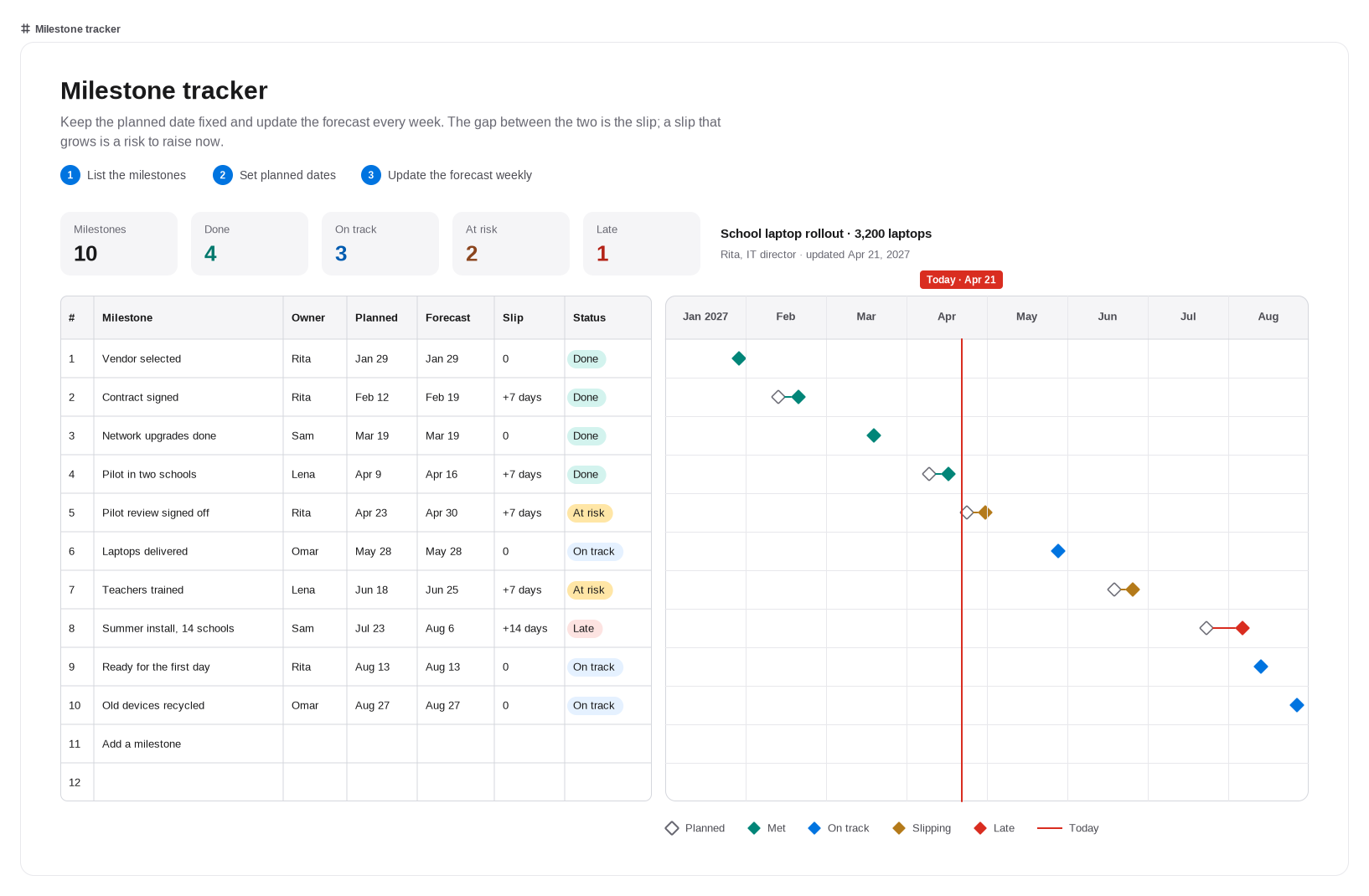
This template shows the list twice: as a table with seven columns and as a row of diamonds on a calendar from January to August. Five counters above them sum up the status. The example is a school laptop rollout of 3,200 laptops, led by Rita, the IT director, and updated on Apr 21, 2027.
The table: planned, forecast and slip
Each row is one milestone, with a number, a name, an owner and four cells that do the tracking: Planned, Forecast, Slip and Status.
The rule is printed on the board: “Keep the planned date fixed and update the forecast every week.” Row 2 shows why. “Contract signed” was planned for Feb 12 and happened on Feb 19, so the slip reads “+7 days” even though the status is Done. If the planned date had been moved to match, the week that was lost would have vanished from the record.
The status column uses four words only: Done, On track, At risk and Late.
The calendar: two diamonds for every milestone
To the right of each row, the same milestone is drawn on a calendar with a column for every month. A hollow diamond marks the planned date. A filled diamond marks the forecast, or the real date once the milestone is met. A short line joins the two, and its length is the slip.
Color carries the status: green for met, blue for on track, amber for slipping and red for late. A milestone that is on time, like “Vendor selected” on Jan 29, shows a single diamond. A red line labelled “Today · Apr 21” runs down the calendar, so you can tell what is history and what is still a forecast.
Watch for a slip that grows
Read rows 5 to 8 together. “Pilot review signed off” has moved from Apr 23 to Apr 30, a slip of 7 days. “Teachers trained” has moved from Jun 18 to Jun 25, also 7 days. “Summer install, 14 schools” has moved from Jul 23 to Aug 6: 14 days, and its status is Late.
The board calls this out in its first lines: a slip that grows is a risk to raise now. One week lost in April has turned into two by August. The next row shows what is at stake. “Ready for the first day” is still forecast for Aug 13, one week after the install is now due to end. There is no more room to lose.
Not every row follows the trend. “Laptops delivered” holds its date of May 28 with a slip of 0, so one late review has not yet pulled everything with it.
How to use the milestone tracker template
- Add it to your workspace. Use this template copies the laptop rollout onto a board you own.
- List the milestones. Eight to twelve is enough. Word each as something finished, like “Network upgrades done”, and give it one owner.
- Set planned dates. Write them once, place the hollow diamonds and then leave both alone. They are your baseline.
- Update the forecast weekly. Ask each owner for a date. Change Forecast, Slip and Status, drag the filled diamond, move the today line and correct the counters.
The counters give the one-line summary a sponsor wants. In the example: 10 milestones, 4 done, 3 on track, 2 at risk and 1 late.
When a tracker fits, and when you need more
A tracker fits a project whose plan is agreed and whose sponsor asks one thing every week: are we still on time? It is quick to update because it ignores everything between the milestones.
To manage that in-between work, with tasks, bars and dependencies, use a Gantt chart. To present the plan before it starts, when there is no forecast yet, a project timeline is cleaner. And when the weekly update must also cover budget, risks and decisions, put the tracker’s counters into a status report.
Questions about the Milestone tracker template
What is the difference between a planned date and a forecast date?
The planned date is the promise made when the plan was approved, and it stays fixed. The forecast is your current best guess, updated every week. Keeping both lets you see how far the project has drifted instead of only where it stands today.
What counts as a milestone?
A point where something is finished, decided or handed over, with no duration of its own. “Contract signed” and “Laptops delivered” are milestones. “Negotiating the contract” is a task. If you cannot tell on the day whether it happened, it is not a milestone.
When should a milestone be marked at risk?
As soon as the forecast moves past the planned date, or the owner doubts the date, even if nothing is late yet. In the example two milestones are at risk with a slip of 7 days. Marking them early is what gives the sponsor time to help.
Does the milestone tracker work on the Free plan?
Yes. With 102 elements it sits well under the Free plan’s limit of 150 on a board, which leaves space for the eleventh and twelfth rows. Each new milestone adds two diamonds and a line on the calendar.