What is a project status report?
A status report tells the people who pay for a project, or wait for it, where it stands. It is written every week or two, it has the same layout every time, and it should be readable without a meeting. Readers want three answers: is it on track, what changed, and do you need anything from me?
This template puts those answers on one page. The example is a warehouse system rollout across three sites: report 11, for the week ending Apr 16, 2027, written by Leo, the project manager. It is a useful example because the news is mixed. Two sites are live and one link is late.
Start with the verdict
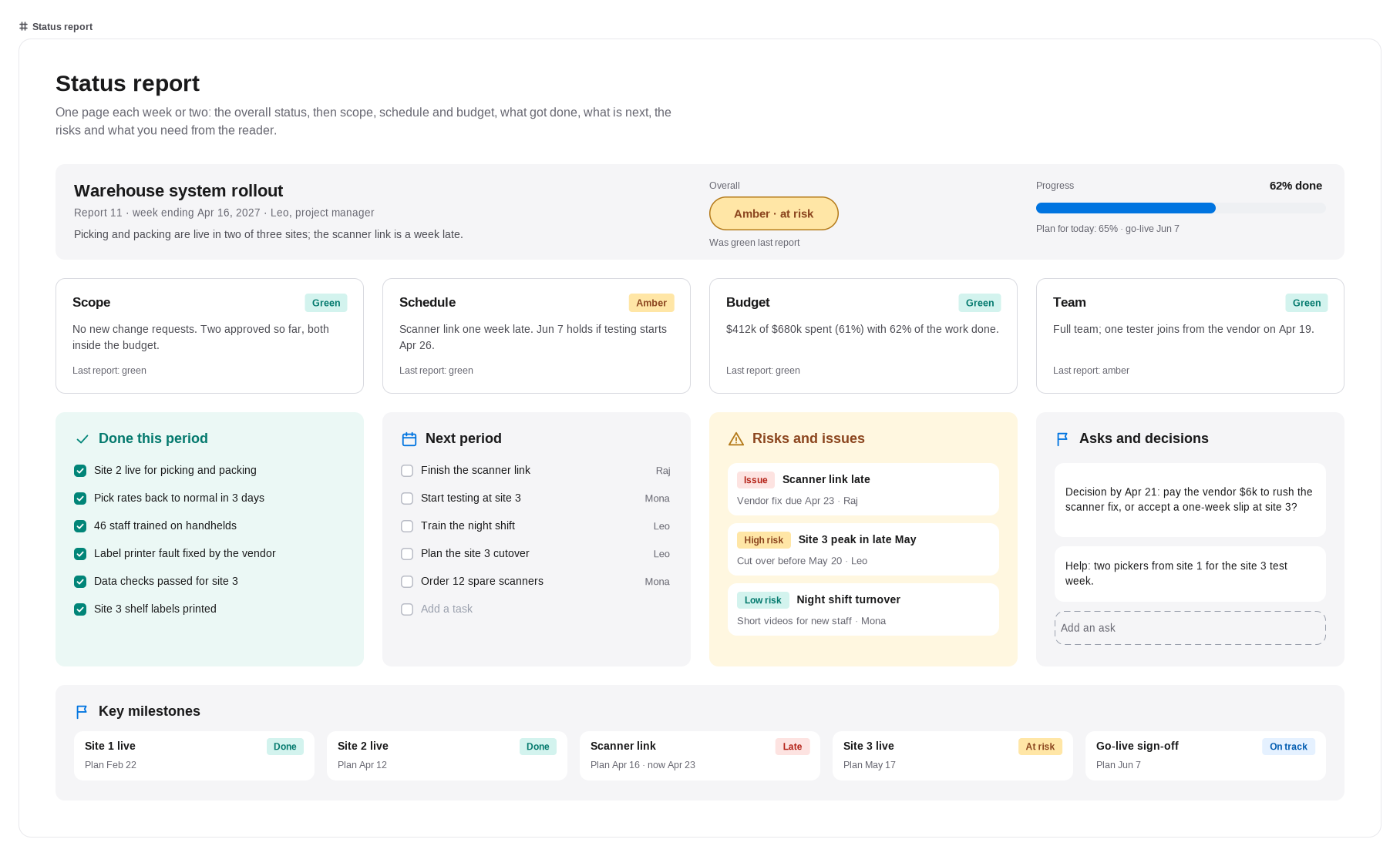
The header carries the project name, one summary sentence and the overall status as a colored tag. The example reads “Amber · at risk”, and under it “Was green last report”. That second line matters as much as the color. A reader who sees the change knows where to look.
Beside it is a progress bar: 62% done against a plan for today of 65%, with go-live on Jun 7. Four tiles below break the verdict into Scope, Schedule, Budget and Team. Three are green. Schedule is amber, and it says why in a sentence: the scanner link is one week late, and Jun 7 holds if testing starts Apr 26.
Give every color a reason
A tile that only says “Green” asks the reader to trust you. A tile with a number lets them check. The Budget tile in the example reads “$412k of $680k spent (61%) with 62% of the work done.” Spend and progress are side by side, so the green is earned.
The Team tile shows the other use of a tile: recording a recovery. It says the team is full and one tester joins from the vendor on Apr 19, and the line beneath reads “Last report: amber”. Keep that last-report line on every tile. A status that never moves teaches readers to stop reading.
Done this period, next period
Two lists follow. Done this period holds finished things, written as results: “Site 2 live for picking and packing”, “46 staff trained on handhelds”, “Pick rates back to normal in 3 days”. There are six, each on one line.
Next period is a list of commitments, and each one has a name at the end of the line. Raj finishes the scanner link, Mona starts testing at site 3 and orders 12 spare scanners, Leo trains the night shift. In the next report these lines should reappear under Done, or the reader will ask why not.
Risks, issues and what you need from the reader
The third panel separates an issue, something that has already happened, from a risk, something that might. The issue is the late scanner link, with the vendor fix due Apr 23. The high risk is the site 3 peak in late May, answered by cutting over before May 20. A low risk, night shift turnover, gets one line and one owner.
The last panel is the reason many people open the report at all: Asks and decisions. The example asks for a decision by Apr 21: pay the vendor $6k to rush the scanner fix, or accept a one-week slip at site 3? It gives the choice, the price and the deadline. The second card asks for help: two pickers from site 1 for the site 3 test week.
How to use the status report template
- Open it as a new board. Use this template copies the warehouse report into your workspace. Duplicate your own board each period so the layout never changes.
- Update the milestones first. Set each card at the bottom to Done, On track, At risk or Late, and add the new date beside the planned one, as in “Plan Apr 16 · now Apr 23”.
- Color the four tiles. Decide each tile from the facts, write its sentence, and move the old color down to the last-report line.
- Move the lists on. Finished items go from Next period to Done this period. Then write the new commitments with names.
- Set the overall status last. Choose it from the tiles and milestones, then rewrite the summary sentence in the header to match.
When one page is enough, and when it is not
The report suits any project with sponsors or clients who do not attend the daily work. Send it on the same day each period, as a link to the board or as a PDF export.
It is a summary. When the risks outgrow three lines, keep them in a risk register and report only the top few here. If the reader mostly cares about dates, a milestone tracker may be all they need. And when an ask turns into a real change of scope or budget, write it up as a change request so the decision is on record.
Questions about the Status report template
What do red, amber and green mean in a status report?
Green: on plan, no action needed. Amber: a problem exists and the team has a way to handle it, as with the late scanner link in the example. Red: the plan cannot be met without a decision or help from outside the team.
How often should I send a status report?
Match the pace of the project. Weekly suits a project of a few months, every two weeks suits a longer one. What counts is the fixed rhythm, so that a missing report is itself noticed.
How long should a status report be?
One page. The template limits each tile to a sentence and each list to about six lines on purpose. Anything longer belongs in a linked document, and the report only points to it.
Should I report bad news as amber or red?
Report it early and honestly. Amber with a clear plan and a date builds more trust than green followed by a sudden red. Use the Asks panel to say exactly what would turn it back to green.