What is quarterly planning?
Quarterly planning is the meeting, or the week, where a team decides what it will finish in the next three months. The hard part is not finding ideas. It is fitting them into the weeks the team has, and saying no to the rest in a way that sticks.
This template gives that conversation six areas: quarter goals, capacity, initiatives, a parking list, risks and dependencies. The example is Trailhead, a hiking app, planning Q3 2027 with six engineers.
Quarter goals: an outcome and a number
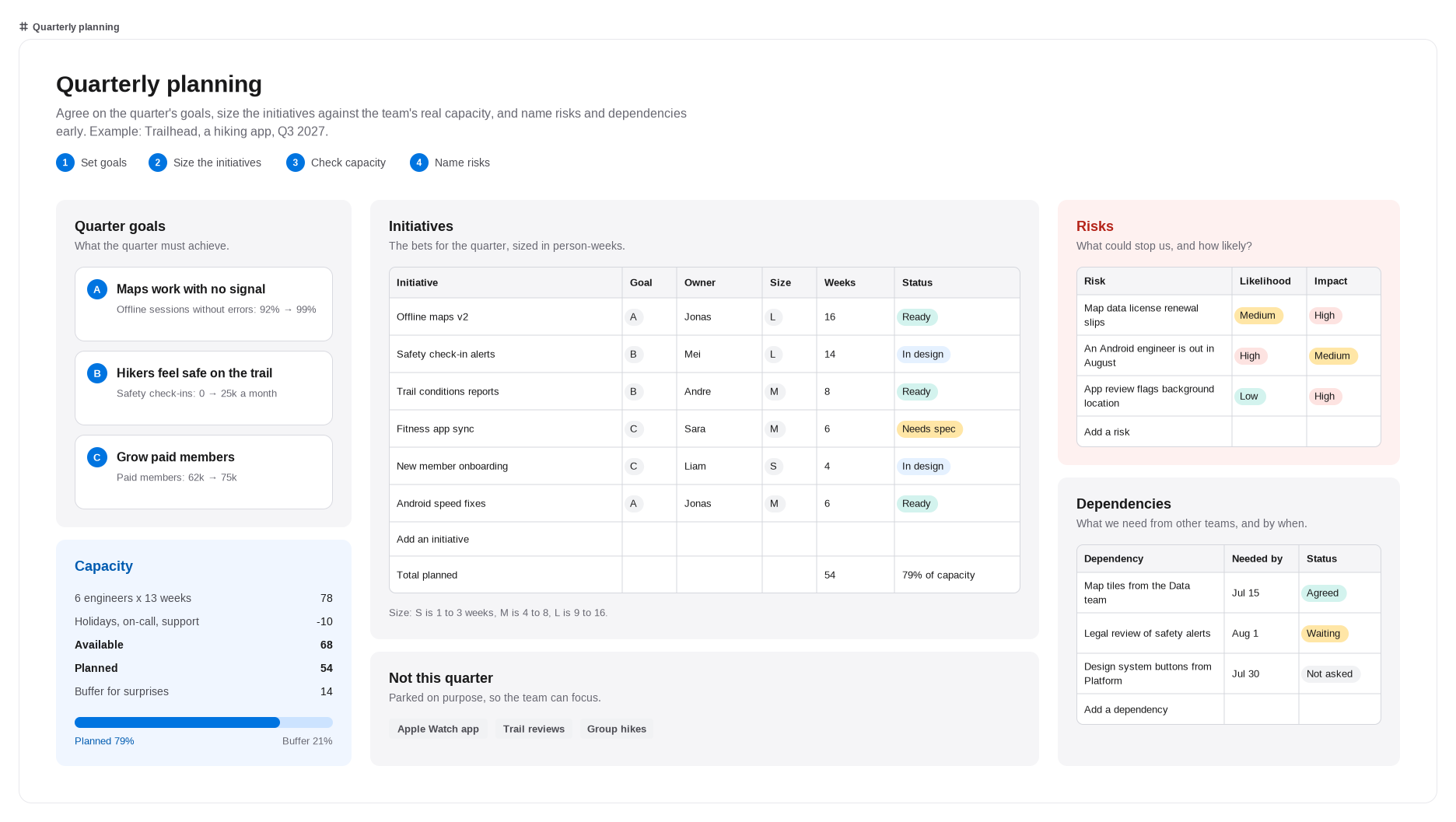
The first card holds three goals, lettered A, B and C. Each has a plain sentence and a measure with a start and an end:
- A. Maps work with no signal. Offline sessions without errors: 92% to 99%.
- B. Hikers feel safe on the trail. Safety check-ins: 0 to 25k a month.
- C. Grow paid members. Paid members: 62k to 75k.
The sentence is written from the user’s side, and the number says how the team will know. The letters matter later: every initiative in the table points back to one of them.
Initiatives sized in person-weeks
The middle of the board is a table of the bets for the quarter. Its columns are Initiative, Goal, Owner, Size, Weeks and Status. Offline maps v2 serves goal A, belongs to Jonas, is an L and takes 16 weeks. New member onboarding serves goal C, belongs to Liam, is an S and takes 4.
A legend under the table defines the sizes: S is 1 to 3 weeks, M is 4 to 8, L is 9 to 16. Sizing in person-weeks keeps the estimate rough enough to make in a meeting and exact enough to add up. The status column, with values such as Ready, In design and Needs spec, shows which bets can start on day one. The last row totals the column: 54 weeks planned, 79% of capacity.
Check the plan against real capacity
The Capacity card does a small piece of arithmetic that many plans skip. Six engineers times 13 weeks is 78 person-weeks. Take away 10 for holidays, on-call and support, and 68 are available. The table plans 54. That leaves a buffer of 14 for surprises, drawn as a bar: Planned 79%, Buffer 21%.
Two lines in that sum protect the quarter. The subtraction admits that nobody codes for thirteen straight weeks. The buffer admits that something will go wrong. A plan at 100% of capacity is late before it starts, so if your planned figure passes about 80%, take a bet out.
Not this quarter
Below the table is a card most planning boards leave out. It is headed "Parked on purpose, so the team can focus" and holds three tags: a smartwatch app, Trail reviews and Group hikes.
Writing down what you will not do is what makes the yes list believable. When someone asks in week five where group hikes went, the answer is on the board: considered, parked, and open again next quarter. Move a bet here the moment the capacity sum says it does not fit.
Risks and dependencies
The right column has two small tables. Risks asks "What could stop us, and how likely?" and rates each line for likelihood and impact. "Map data license renewal slips" is Medium and High. "App review flags background location" is Low and High.
Dependencies lists what the team needs from other teams, and by when: map tiles from the Data team by Jul 15, status Agreed; a legal review of safety alerts by Aug 1, status Waiting; design system buttons from Platform by Jul 30, status Not asked. That last status is the most useful one on the board. It is a job for this week.
How to use the quarterly planning template
- Open it as a new board. Trailhead’s Q3 stays in the copy so you can see the level of detail to aim for.
- Set goals. Write two or three, each with a measure that moves from one number to another.
- Size the initiatives. List every candidate in the table, tag it with a goal letter and give it S, M or L and a week count.
- Check capacity. Redo the sum for your headcount. Park bets under Not this quarter until planned sits near four fifths of available.
- Name risks. Fill both right-hand tables and assign someone to chase every dependency that is not yet agreed.
When this template fits, and when another does
It suits a product or engineering team of five to fifteen people planning one quarter. Above that size, run one board per team.
For the full year’s goals and dates, start from annual planning. To break a quarter’s first weeks into tasks, move to sprint planning. And if the debate is which bets deserve a place at all, score them first with RICE scoring.
Questions about the Quarterly planning template
How much of a team’s capacity should a quarter plan use?
About 80%. The example plans 54 of 68 available person-weeks, which is 79%, and keeps 14 weeks as a buffer. Teams with heavy support duty or a lot of unknown work should plan less, closer to 70%.
What is a person-week?
One person working for one week. An initiative of 8 person-weeks could be one engineer for two months or two engineers for one. It is a unit for comparing bets and adding them up, not a promise about the calendar.
How is quarterly planning different from OKRs?
OKRs define what you want to reach and how you will measure it. Quarterly planning also covers the work: which initiatives, who owns them, how many weeks they take and what might block them. Many teams set OKRs first and then use a board like this to plan against them.
Who should be in the planning session?
The people who will do the work and the person who sets priorities. That usually means the team lead, the product manager, the designers and the engineers. Invite someone from each team in the Dependencies table for the last fifteen minutes.