What is a one-page project plan?
A one-page project plan is the whole plan in a form a busy person will read. In the words on the board, it is a page “anyone can read in two minutes”. It does not replace the schedule or the budget sheet. It sits on top of them and answers the questions people ask most: what is this for, is it on time, who is on it and what does it need from me?
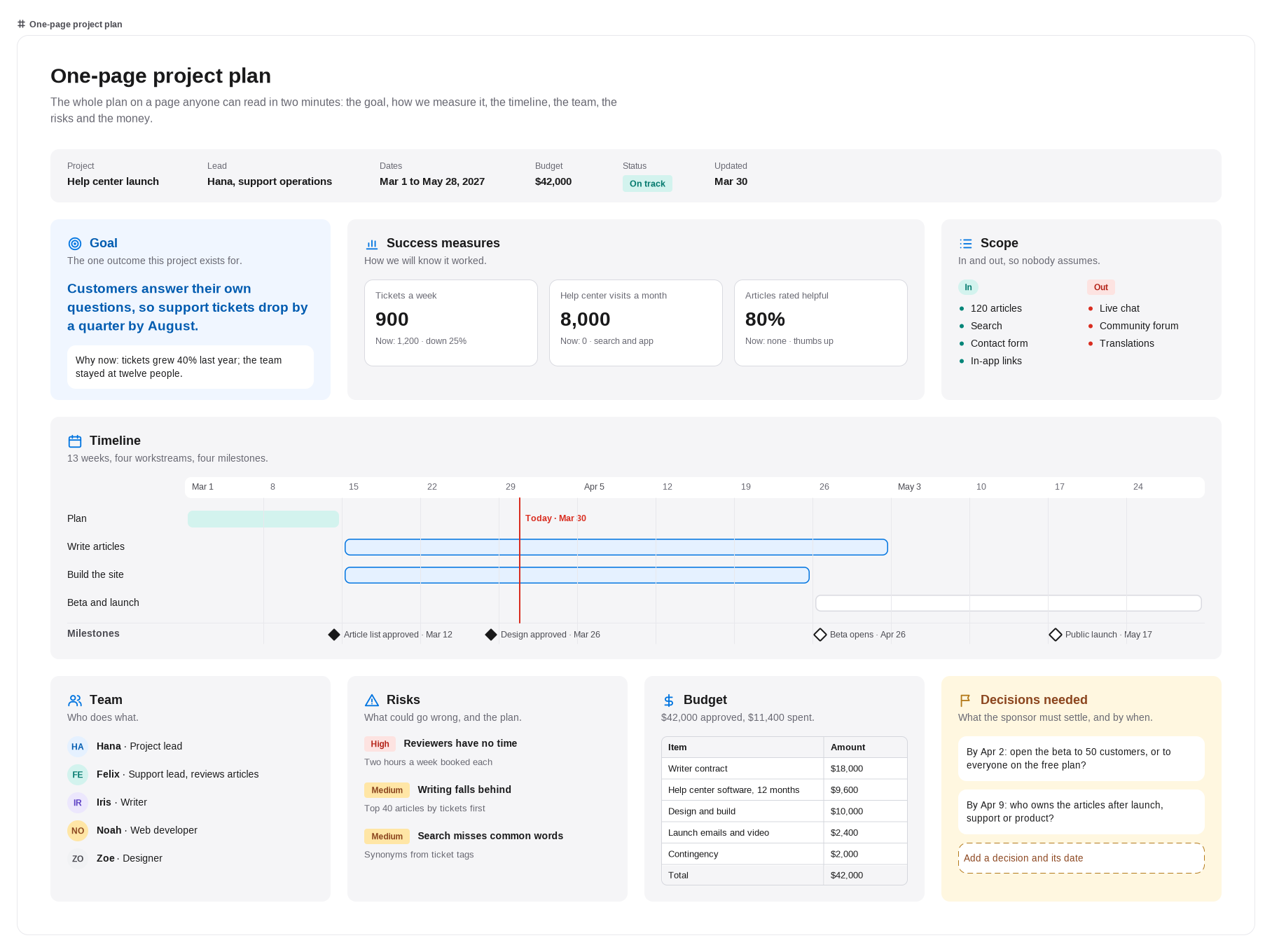
This template arranges eight blocks under a header strip. The example is “Help center launch”, led by Hana from support operations, running from Mar 1 to May 28, 2027. The header shows its status, “On track”, and the date of the last update, Mar 30.
Goal, success measures and scope
The top row says what the project is for. The Goal block holds one sentence: “Customers answer their own questions, so support tickets drop by a quarter by August.” A line under it adds the reason for doing it now: tickets grew 40% last year while the team stayed at twelve people.
Success measures turns the goal into three tiles, each with a target and a starting point. Tickets a week: 900, from 1,200 now. Help center visits a month: 8,000, from 0. Articles rated helpful: 80%.
Scope is two short columns. In: 120 articles, search, a contact form and in-app links. Out: live chat, a community forum and translations. Its subtitle gives the reason for writing both: “In and out, so nobody assumes.”
The timeline in the middle
The widest block is the timeline, summed up in its subtitle: “13 weeks, four workstreams, four milestones.” The weeks run across the top, labelled by date from Mar 1 to May 24. Four bars sit below, one for each workstream: Plan, Write articles, Build the site, and Beta and launch.
Under the bars, a row of diamonds marks the milestones: “Article list approved · Mar 12”, “Design approved · Mar 26”, “Beta opens · Apr 26” and “Public launch · May 17”. A marker shows “Today · Mar 30”. The first two diamonds are filled because those dates are behind it.
This is as much schedule as a one-page plan can hold. Four bars and four dates tell a reader whether the launch is near. The task-level plan lives elsewhere.
Team and risks
The Team block lists five people with a role each, so a reader knows who to ask: Hana is project lead, Felix is the support lead who reviews articles, Iris writes, Noah builds the site and Zoe designs it.
The Risks block keeps to three, each with a level and a plan in a few words. The high one is “Reviewers have no time”, answered with “Two hours a week booked each”. “Writing falls behind” is answered with “Top 40 articles by tickets first”, which is a way of saying: if we cannot write all 120 in time, we know which ones matter.
Budget and decisions needed
The Budget block opens with the line a sponsor reads first: “$42,000 approved, $11,400 spent.” Five items follow, from the writer contract at $18,000 to a contingency of $2,000.
The last block is the one most plans lack: Decisions needed. It lists what the sponsor must settle, each with a date. “By Apr 2: open the beta to 50 customers, or to everyone on the free plan?” “By Apr 9: who owns the articles after launch, support or product?” A plan that only reports is easy to skim past. A plan that asks for an answer by a date gets a reply.
How to use the one-page project plan template
- Open the template as your own board. Use this template copies the help center plan so you can overwrite it block by block.
- Write the goal and its measures. One sentence with an outcome and a date, then three numbers with their value today.
- Draw the line on scope. Fill In, then spend as long on Out.
- Lay out the timeline. Rename the four bars, stretch them over your weeks and move the diamonds to your milestone dates.
- Fill the bottom row. Team, the top three risks, the budget lines and every decision you are waiting for.
- Keep the header current. Each week, change the status and the Updated date and slide the today marker.
When one page is the right size
One page suits projects of one to six months with a small team, and any project whose sponsor will not open a longer document. Update it weekly and send the same page every time.
It does not approve a project: that is the job of a project charter, written before the start. It does not schedule tasks: when four bars are too few, keep a Gantt chart behind it. And if your weekly update needs a record of what was done and what comes next, a status report is built for that.
Questions about the One-page project plan template
What should a one-page project plan include?
The goal, how success is measured, what is in and out of scope, a timeline with the main milestones, the team, the top risks and the budget. This template adds a block for decisions the sponsor has to make, which is often the most read part.
Who is a one-page project plan for?
For everyone outside the core team: the sponsor, other department heads, new joiners and anyone who asks how the project is going. The team itself works from more detailed tools and uses the page to stay aligned on the goal and scope.
How often should the plan be updated?
Once a week is a good rhythm. Change the status and the update date in the header, move the today marker, adjust the spent amount and replace decisions that have been made with new ones. A page with an old date on it stops being trusted.
Which plan does this template need?
The board has 158 elements. A Free board holds up to 150, so opening this template takes the Pro or Team plan. With Team, the project lead and the people who own each block can edit the page together.