What is a project roadmap?
A project roadmap shows what several teams plan to work on over a long stretch, usually a year, in large blocks. Each team or workstream gets a lane. Each block of work, an initiative, is a bar in that lane. The roadmap gives up precision to gain range: it speaks in months and quarters, never in days.
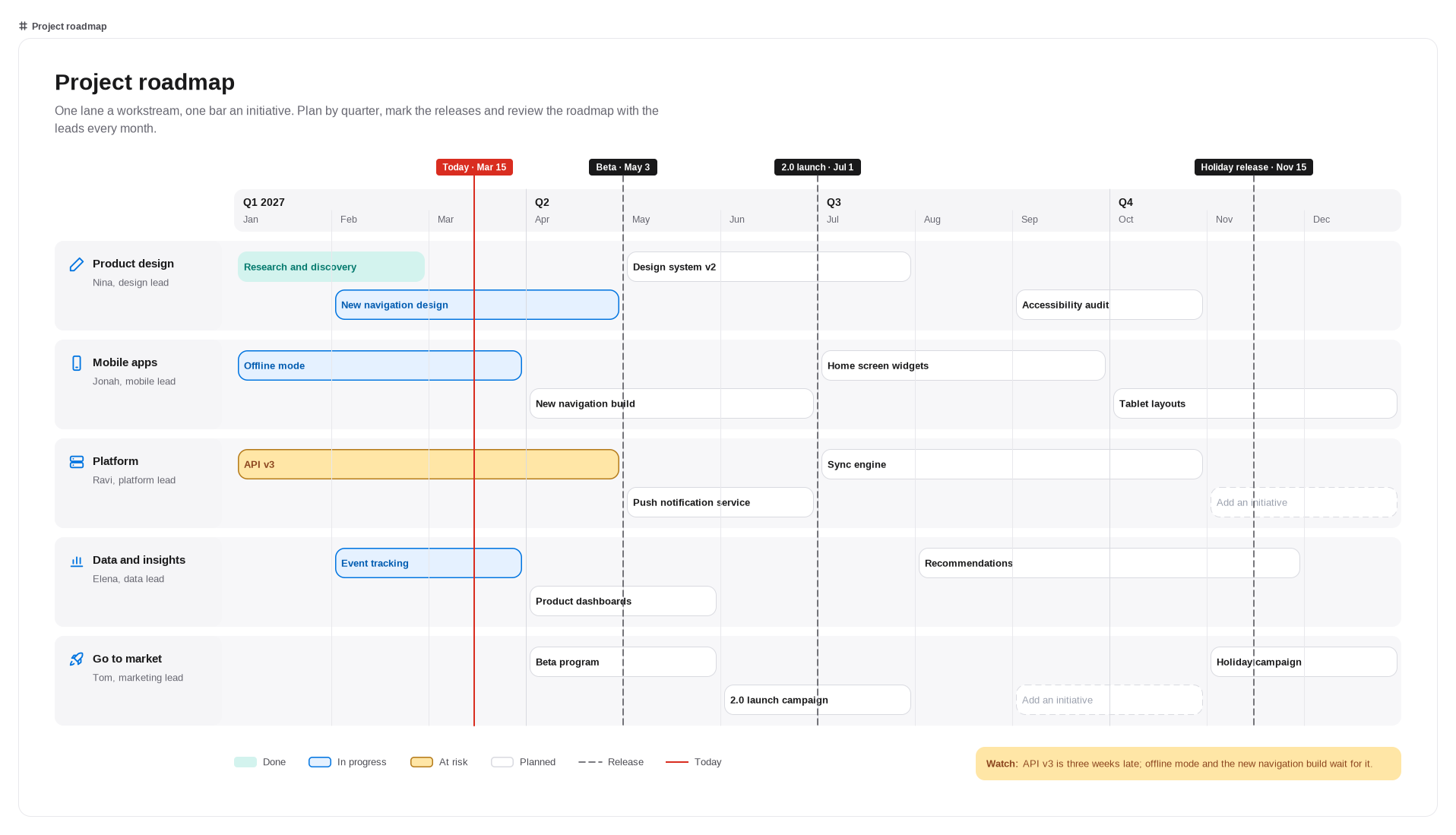
This template lays out five lanes across the four quarters of 2027. It is filled in for a product team working toward the 2.0 release of an app, with design, mobile, platform, data and go-to-market work running side by side.
Quarters, months and release markers
The top of the board is the time scale: Q1 2027 to Q4, with the twelve months underneath. Bars start and end on month boundaries. “Research and discovery” covers January and February. “Design system v2” runs from May through July.
Above the scale sit the dates that everything else serves: “Beta · May 3”, “2.0 launch · Jul 1” and “Holiday release · Nov 15”. Each is a flag with a line that drops through all five lanes, so every team can see which of its bars must be finished before the line. A fourth marker, “Today · Mar 15”, shows how far the year has run.
One lane a workstream
Each lane starts with a label that names the workstream and the person who leads it: “Mobile apps, Jonah, mobile lead” or “Platform, Ravi, platform lead”. A lane has two rows, so work that overlaps in time fits without bars sitting on each other. In the mobile lane, “Offline mode” fills the first quarter, “New navigation build” takes the second, “Home screen widgets” the third and “Tablet layouts” the fourth.
Read across a lane and you have one team’s year. Read down a month and you have everything in motion at once. In May that is the design system, the navigation build, the push notification service, the product dashboards and the beta program: a busy month, visible before it arrives.
Status colors and the Watch note
A bar’s color is its status, and the legend at the bottom names the four: done, in progress, at risk and planned. On Mar 15 one bar is green, “Research and discovery”. Three are blue and under way. Most are plain outlines, because most of the year is still ahead.
One bar is amber: “API v3”, in the platform lane. A roadmap has no arrows between bars, so the trouble it causes elsewhere is written down in a single line at the bottom: “Watch: API v3 is three weeks late; offline mode and the new navigation build wait for it.” That sentence links three bars in two lanes. Keep the Watch line to the one or two issues the leads should talk about this month.
How to use the project roadmap template
- Open a copy of the board. Use this template gives you all five lanes with the example bars in place.
- Name the lanes. One for each team or workstream, with its lead. Delete a lane or duplicate one to match your project.
- Add the bars. One bar for each initiative of one to four months. Drag its ends to the months it covers. The dashed “Add an initiative” bars show where new ones go.
- Mark the releases. Move the three flags to your own dates and rename them.
- Color and review. Set each bar’s status, move the today marker and rewrite the Watch line. The board suggests doing this with the leads every month.
When a roadmap fits, and when it is too coarse
Use a roadmap when several teams share a set of dates and leaders need to see the year on one screen. It is a planning and alignment tool, good for a monthly review.
It is too coarse to run daily work. Inside one workstream, a Gantt chart gives each task its dates and its dependencies. For a single project with one sequence of phases, a project timeline is simpler to read. And if you cannot commit to dates yet, a now, next, later roadmap orders the work without them.
Questions about the Project roadmap template
What is the difference between a project roadmap and a Gantt chart?
A roadmap shows initiatives by team over quarters and leaves out tasks and dependency arrows. A Gantt chart shows tasks by week with owners, progress and the links between them. Leaders read the roadmap; the people doing the work read the Gantt chart.
How far ahead should a project roadmap look?
Usually two to four quarters. The near quarter should be firm, with bars the teams have agreed to. Later quarters are intentions and will change, which is fine as long as everyone reads them that way. The example plans one calendar year.
How do I show that one initiative depends on another?
Place the dependent bar to the right of the one it needs, and name the link in the Watch line when it is in danger. If you find yourself wanting arrows between many bars, the plan has grown detailed enough for a Gantt chart or a dependency map.
Can I use the roadmap template for free?
Yes. The board has 98 elements, so it fits a Free board’s 150 with room for a sixth lane. When it is ready, export it as PNG, SVG or PDF to share with people outside your workspace.