What is a resource plan?
A resource plan shows how much of each person’s time is booked on project work, period by period. It exists to answer one question before the work starts: do we have the people for this, in the weeks we need them?
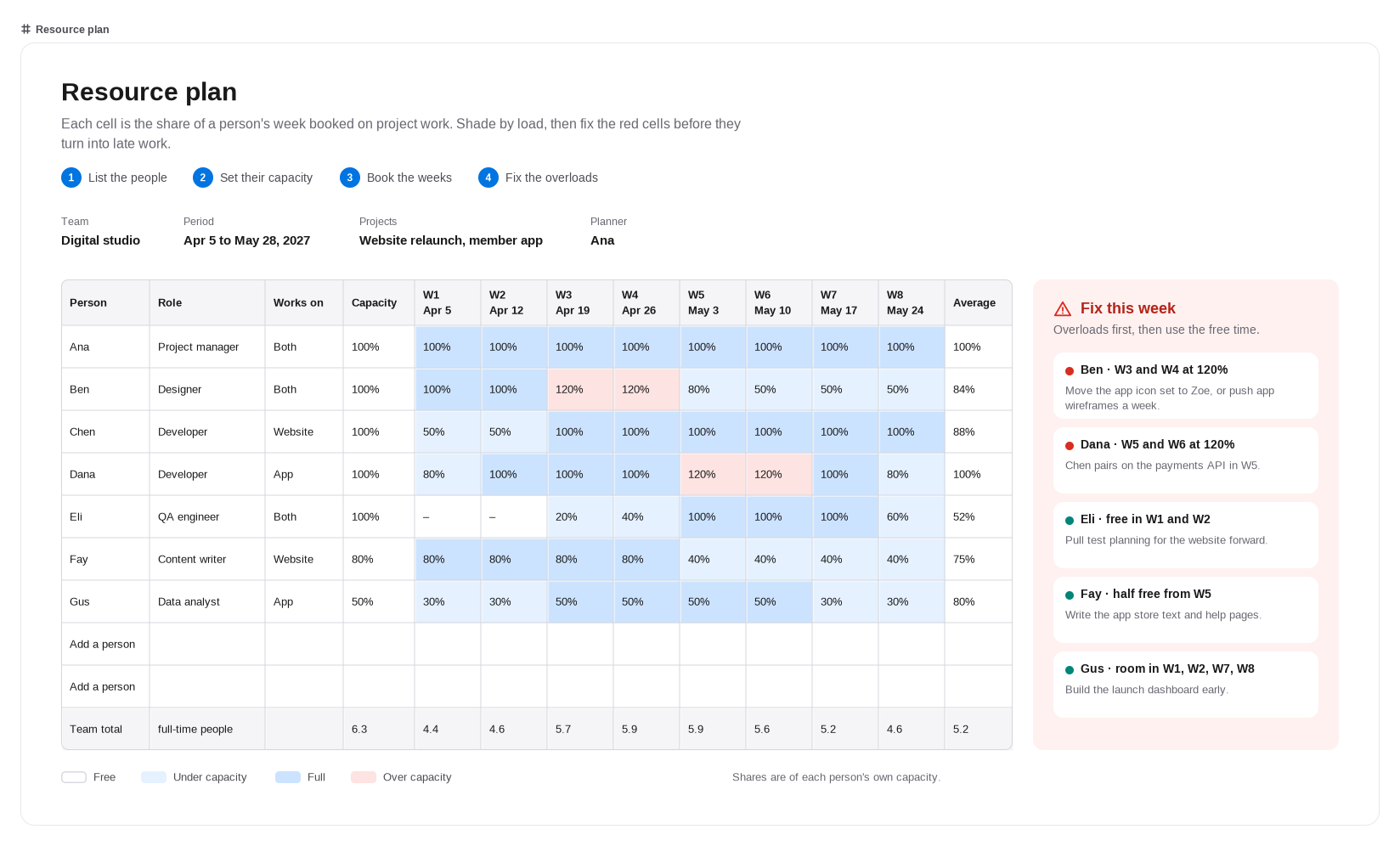
This template is a heat map. Rows are people, columns are weeks, and every cell is the share of that person’s week that is already taken. The example is a digital studio running two projects at once, a website relaunch and a member app, from Apr 5 to May 28, 2027. A panel on the right turns the red and pale cells into a short list of actions.
People, capacity and eight weeks
The first four columns describe the person: name, role, which project they work on and their capacity. Capacity is the part of a full week they can give to project work at all. Most of the studio is at 100%. Fay, the content writer, is at 80% and Gus, the data analyst, at 50%.
Then come eight weekly columns, W1 starting Apr 5 through W8 starting May 24, and an Average at the end. Read Ben’s row: 100% for two weeks, 120% in W3 and W4, then down to 80% and 50%. Dana, the app developer, peaks later, at 120% in W5 and W6. The two red pairs do not overlap, which already hints at who could help whom.
Shade by load, and total the team
The key under the table names four shades: Free, Under capacity, Full and Over capacity. The shade compares a cell with that person’s own capacity. Gus at 50% is shaded Full, because 50% is all he has. Eli, the QA engineer, has a dash in W1 and W2: nothing is booked yet.
The bottom row adds each week up in full-time people. The studio has 6.3 people’s worth of capacity. It uses 4.4 in the first week and 5.9 at the peak in W4 and W5. A total under the capacity while two cells are red tells you the team as a whole has room. The work is on the wrong desks.
Two rows say “Add a person”. Every number in the table is typed text, so when you change a cell, redo the average and the weekly total yourself.
Fix this week
The panel on the right is what makes the plan useful. Its rule: “Overloads first, then use the free time.” Each card names a person, the weeks and one action.
- Ben, W3 and W4 at 120%. Move the app icon set to Zoe, or push the app wireframes a week.
- Dana, W5 and W6 at 120%. Chen pairs on the payments API in W5.
- Eli, free in W1 and W2. Pull test planning for the website forward.
- Fay, half free from W5. Write the app store text and help pages.
- Gus, room in four weeks. Build the launch dashboard early.
An overload has only a few honest fixes: give the work to someone else, move it in time, or cut it. Write which one you chose.
How to use the resource plan template
- Open it as a new board. Use this template gives you a copy with the studio example filled in.
- List the people. Set the team, the period and the projects in the header line, then retype the Person, Role and Works on columns.
- Set their capacity. Subtract support duty, management and part-time hours. Few people have 100% for project work.
- Book the weeks. For each person, estimate the share of each week the planned tasks need, type it in and recolor the cell to match the key.
- Fix the overloads. Write one card per red cell and per large gap, agree it with the person named, and update the cells once the change is made.
When a resource plan helps
Use it when the same people serve more than one project, when a plan depends on a specialist, or before you promise a date. A month or two in weekly columns is a good range. Beyond that the percentages are guesses.
The plan shows load, not tasks. For the order and dates of the work itself, pair it with a Gantt chart. To settle who is responsible for what, rather than how busy they are, use a RACI matrix. A scrum team that plans in points can do the same check per sprint on the sprint planning board.
Questions about the Resource plan template
What is the difference between capacity and allocation?
Capacity is the time a person can give to project work. Allocation is the time the plan asks of them. When allocation is above capacity the cell is red. In the example Gus has a capacity of 50%, so a 50% week is already full for him.
Should I plan people at 100%?
Rarely. Meetings, support questions and sick days take a share of every week. Many planners set capacity at around 80% of working time for that reason and treat anything above it as an overload.
Can I plan by day or by month instead of by week?
Yes. Rename the column heads. Days suit a short event or a launch week, months suit a yearly staffing plan. Weeks are the usual choice because most people can estimate a share of a week with some confidence.
How do I show someone who works on two projects?
The example writes “Both” in the Works on column and books one combined share per week. If you need the split, give the person two rows, one per project, and check that the two rows together stay within their capacity.