What is a risk register?
A risk register is the project’s list of things that could go wrong. For every risk it records what might happen, how likely and how harmful it is, who looks after it and what is being done. It is a working document: the team reads it on a fixed day, changes scores, closes risks that have passed and adds new ones.
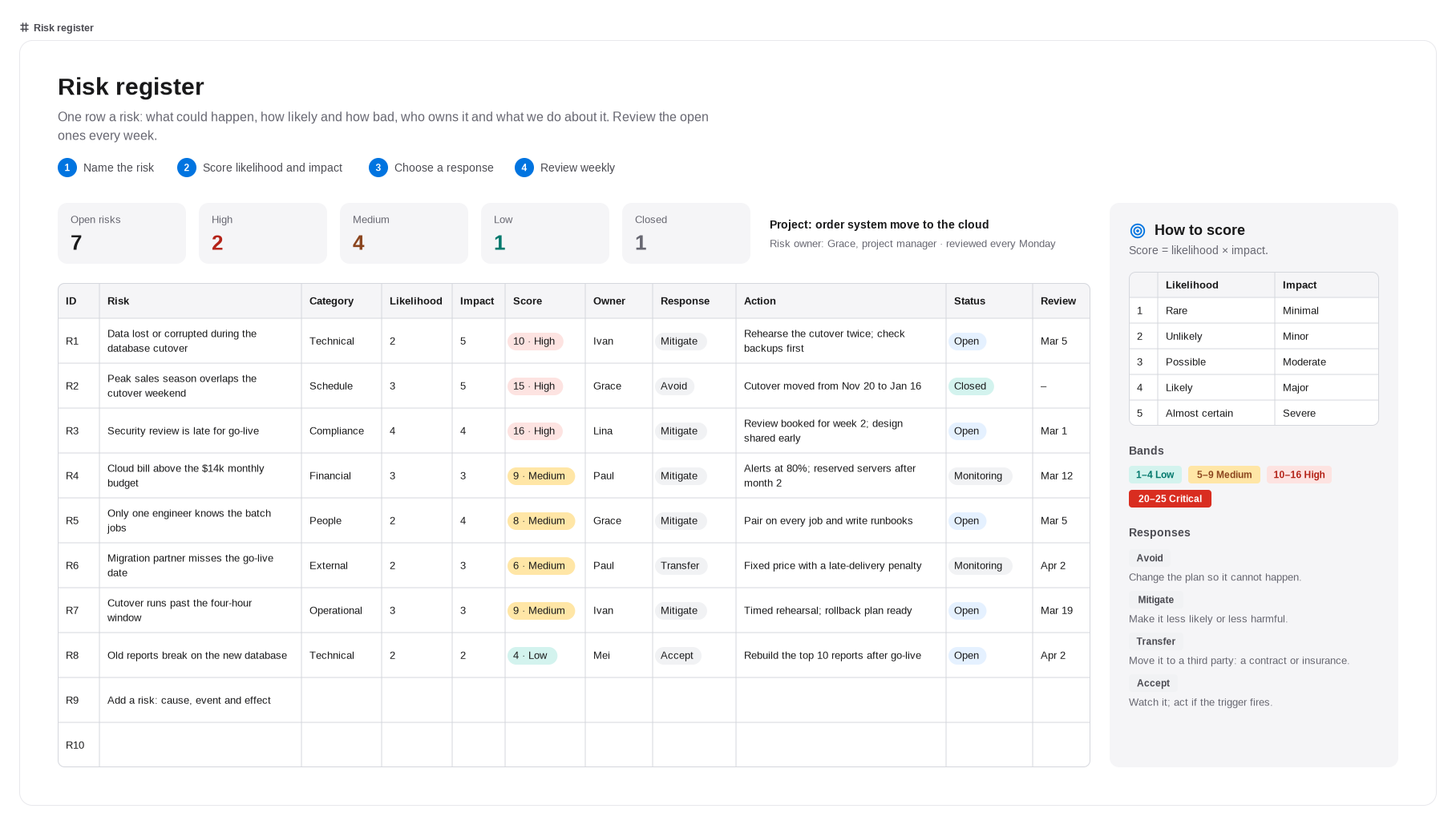
This template is a table with eleven columns, five counters above it and a scoring guide beside it. The example project is “order system move to the cloud”. Grace, the project manager, is the risk owner, and the header says the list is reviewed every Monday.
A risk in one row
The first columns identify the risk: an ID, a description and a category. The descriptions in the example are events you could point at if they happened: “Data lost or corrupted during the database cutover”, “Only one engineer knows the batch jobs”, “Cloud bill above the $14k monthly budget”. Compare that with a vague entry like “data problems”, which nobody can score or own.
The empty row at the bottom gives the recipe: “Add a risk: cause, event and effect”. Say what would trigger it, what would happen and what it would cost.
The category column is a quick check on your own blind spots. The eight risks cover technical, schedule, compliance, financial, people, external and operational. A register where every row says “Technical” has usually been written by engineers alone.
Scoring: likelihood times impact
The side panel states the rule: “Score = likelihood × impact.” A small table gives the words for each number, from 1, rare and minimal, to 5, almost certain and severe. The result falls into one of four bands: 1 to 4 is Low, 5 to 9 is Medium, 10 to 16 is High and 20 to 25 is Critical.
In the register, the score cell shows both the number and the band. “Security review is late for go-live” has a likelihood of 4 and an impact of 4, so it reads “16 · High”. “Old reports break on the new database” has 2 and 2 and reads “4 · Low”. Scores are judgments, not measurements. Their value is that the team agrees on an order.
Four responses
The Response column takes one of four words, and the panel defines each. The example uses all four.
- Avoid. “Change the plan so it cannot happen.” The cutover weekend clashed with the peak sales season, so it was moved from Nov 20 to Jan 16.
- Mitigate. “Make it less likely or less harmful.” Against data loss: rehearse the cutover twice and check backups first.
- Transfer. “Move it to a third party: a contract or insurance.” The migration partner works at a fixed price with a late-delivery penalty.
- Accept. “Watch it; act if the trigger fires.” Old reports may break, and the top 10 will be rebuilt after go-live.
Choosing the word first makes the action easier to write. It also stops every row from ending in “monitor closely”.
Owner, action, status and review
The right half of each row is what keeps a register alive. Owner is one first name: Ivan, Grace, Lina, Paul. Action is something a person can do and finish, such as “Review booked for week 2; design shared early”.
Status shows where the risk stands: Open, Monitoring or Closed. R2, the clash with the sales season, is Closed because the new date removed it. Leave closed risks in the table. They show what the team already dealt with. Review is the date the owner next reports on it, like Mar 5 for the data-loss risk. A row without a review date tends to be forgotten.
How to use the risk register template
- Put a copy on a new board. Use this template brings the cloud move example along, so you can see how a full row reads.
- Name the risk. One row for each, written as cause, event and effect, with a category.
- Score likelihood and impact. Use the 1 to 5 scale in the side panel, multiply, and type the score with its band.
- Choose a response. Pick one of the four, then write the action, the owner and a review date.
- Review weekly. Go through the open rows, change what has moved and correct the counters at the top.
The counters are the summary for a status meeting. In the example: 7 open risks, of which 2 high, 4 medium and 1 low, and 1 closed.
Register, matrix or both?
Any project longer than a few weeks should have a register. It is the only place where each risk has an owner and a next step.
A table is hard to take in at a glance, though. To show priorities in a meeting, plot the same IDs on a risk matrix, which turns the likelihood and impact columns into a heat map. To fill an empty register, hold a pre-mortem and let the team imagine how the project failed. The three biggest risks also belong in the project charter, where the sponsor sees them before signing.
Questions about the Risk register template
What is the difference between a risk and an issue?
A risk has not happened yet and may never happen, so you plan for it. An issue has happened and needs fixing now. When a risk in the register comes true, close the row and handle it as an issue, with its own owner and deadline.
How often should a risk register be reviewed?
On a fixed rhythm that matches the pace of the project. The example is reviewed every Monday. Each row also has its own review date, so slow-moving risks are checked monthly while urgent ones come up every week.
When can a risk be closed?
When it can no longer happen: the event has passed, the plan changed so the risk is gone, or it turned into an issue. In the example the cutover was moved away from the peak sales season, which removed that risk. Keep the closed row as a record.
Is the risk register template free?
Yes. It is one of the lighter boards at 73 elements, far under the 150 that fit on a Free board, because the whole register is a single table. Add as many rows as your project needs.