What is a sprint review?
A sprint review is the meeting at the end of a sprint where the team shows what it finished to the people it built it for. Stakeholders see working software, say what they think, and the backlog is adjusted in response. It is about the product. How the team worked together is the subject of a different meeting, the retrospective.
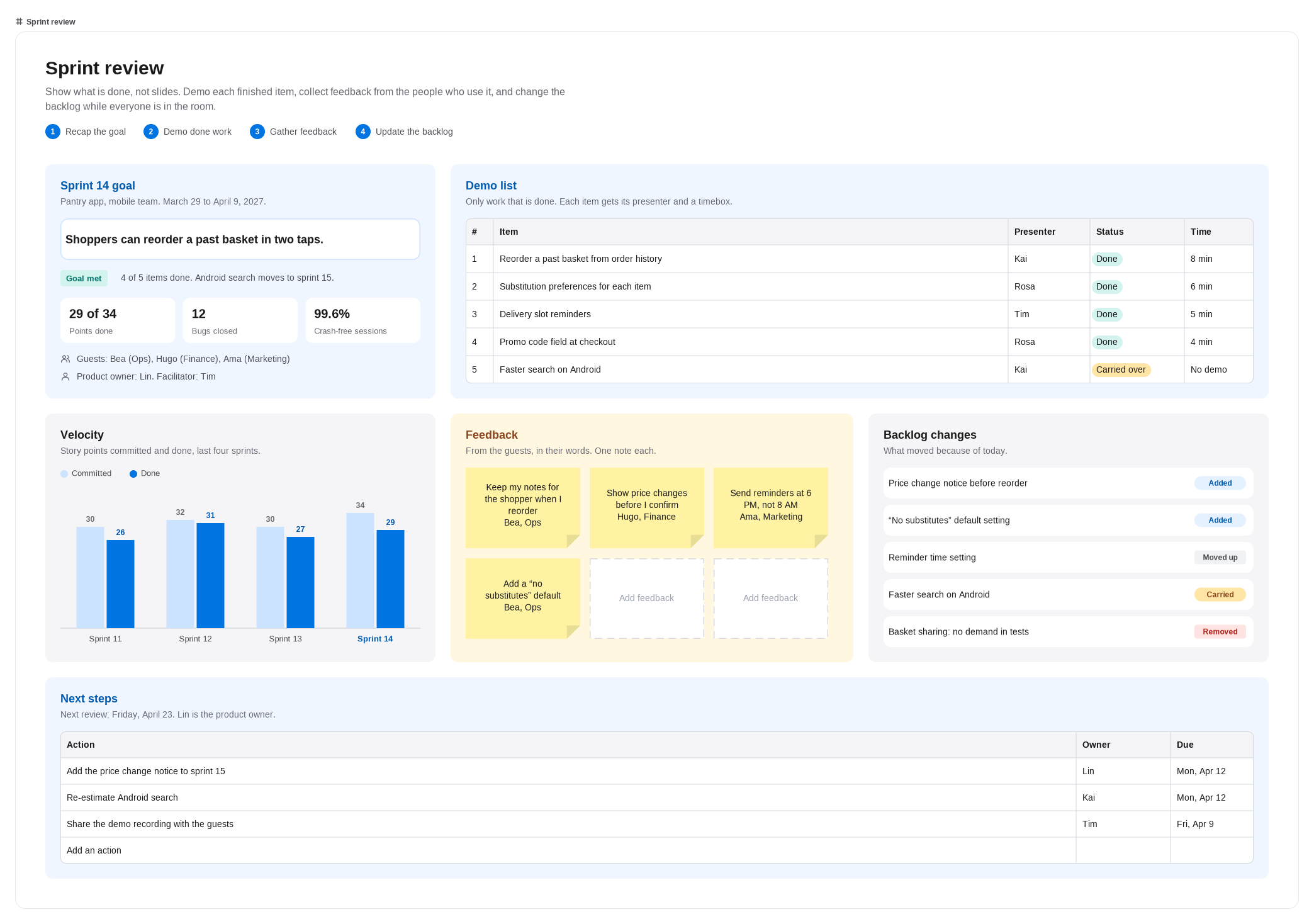
The guidance printed on this template is blunt: “Show what is done, not slides.” The board has six cards that follow the meeting from the goal to the next steps. The example is sprint 14 of a mobile team, which ran from March 29 to April 9, 2027, with three guests from operations, finance and marketing.
Recap the goal and say whether it was met
The first card restates the sprint goal in one sentence: “Shoppers can reorder a past basket in two taps.” Right under it is the verdict, “Goal met”, with the honest detail: “4 of 5 items done”, and one item that moves to sprint 15.
Three figures give the guests a quick sense of the sprint: “29 of 34” points done, 12 bugs closed and 99.6% crash-free sessions. The card ends with who is in the room. “Guests: Bea (Ops), Hugo (Finance), Ama (Marketing)” matters most, because the review exists for them. Lin is the product owner and Tim facilitates.
Starting here takes two minutes and frames everything after it. Each demo can be judged against one question: does this help a shopper reorder in two taps?
Demo only work that is done
The Demo list has a strict subtitle: “Only work that is done. Each item gets its presenter and a timebox.” Its table has five columns: number, Item, Presenter, Status and Time.
- Kai shows “Reorder a past basket from order history” in 8 minutes.
- Rosa shows “Substitution preferences for each item” in 6 minutes and “Promo code field at checkout” in 4.
- Tim shows “Delivery slot reminders” in 5 minutes.
The fifth row is a faster search that was not finished. Its status is “Carried over” and its time cell says “No demo”. Listing it openly is better than hiding it or showing it half built. The four demos add up to 23 minutes, which leaves most of an hour for the part that matters more: what the guests say.
Turn feedback into backlog changes
The Feedback card asks for notes “From the guests, in their words. One note each.” Every note is signed. Hugo from Finance wrote “Show price changes before I confirm”. Ama from Marketing wrote “Send reminders at 6 PM, not 8 AM”. Bea from Ops left two, one of them asking for a “no substitutes” default.
Next to it, Backlog changes records “What moved because of today.” Each line has a tag: Added, Moved up, Carried or Removed. Hugo’s note became “Price change notice before reorder”, tagged Added. Ama’s became “Reminder time setting”, tagged Moved up. One line reads “Basket sharing: no demand in tests” and is tagged Removed.
Keeping the two cards side by side is the point of the template. Guests can see that what they said changed the plan before they left the room, and that is what brings them back to the next review.
Show velocity without making it the story
The Velocity card charts “Story points committed and done, last four sprints.” Sprint 11 shows 30 committed and 26 done, sprint 12 shows 32 and 31, sprint 13 shows 30 and 27, and sprint 14 shows 34 and 29.
The chart gives stakeholders a realistic sense of how much fits in a sprint. In all four sprints the team finished a little less than it committed to, by between one and five points. That is useful when the product owner plans sprint 15 with them. Keep it to one card and one minute. A review that dwells on points has turned into a status meeting.
How to use the sprint review template
- Open it as a new board. Use this template creates your own copy, example included. Fill in the goal card and the demo list the day before the review.
- Recap the goal. Read the goal, give the verdict and the numbers, and introduce the guests.
- Demo done work. Each presenter shows the real product within their timebox. Slides stay closed.
- Gather feedback. After each demo, write what guests say on a note in their own words and add their name.
- Update the backlog. With everyone present, the product owner tags each change, then fills in Next steps. In the example Lin will “Add the price change notice to sprint 15” by Mon, Apr 12.
Sprint review, retrospective or planning?
Use this board at the end of every sprint, with people from outside the team in the room. If nobody outside the team attends, you are holding a team demo, and the Feedback card will stay empty.
The review looks at the product. To look at how the team worked, follow it with a retrospective such as start stop continue. The backlog changes you record here feed straight into sprint planning, and the full list of work lives in the product backlog.
Questions about the Sprint review template
What is the difference between a sprint review and a sprint retrospective?
The review is about the product: the team shows finished work to stakeholders and adjusts the backlog. The retrospective is about the process: the team alone discusses how it worked and what to change. They happen one after the other and should not be merged.
Who should come to a sprint review?
The whole team, the product owner, and the people who use or depend on what was built. The example invites guests from operations, finance and marketing. Customers or support staff are good guests too.
Should unfinished work be shown?
No. The demo list on this template is for done work only. Unfinished items are listed with the status Carried over and no demo, so stakeholders know where they stand without judging something half built.
How long does a sprint review take?
About an hour for a two-week sprint is a common length. In the example the four demos take 23 minutes in total, which leaves the larger share of the hour for feedback and backlog changes.