What is a stakeholder map?
A stakeholder is anyone who can help, block, pay for or be changed by your project. A stakeholder map sorts those people by two things: how much power they have over the project and how much interest they take in it. Where a person falls tells you how much of your time they should get.
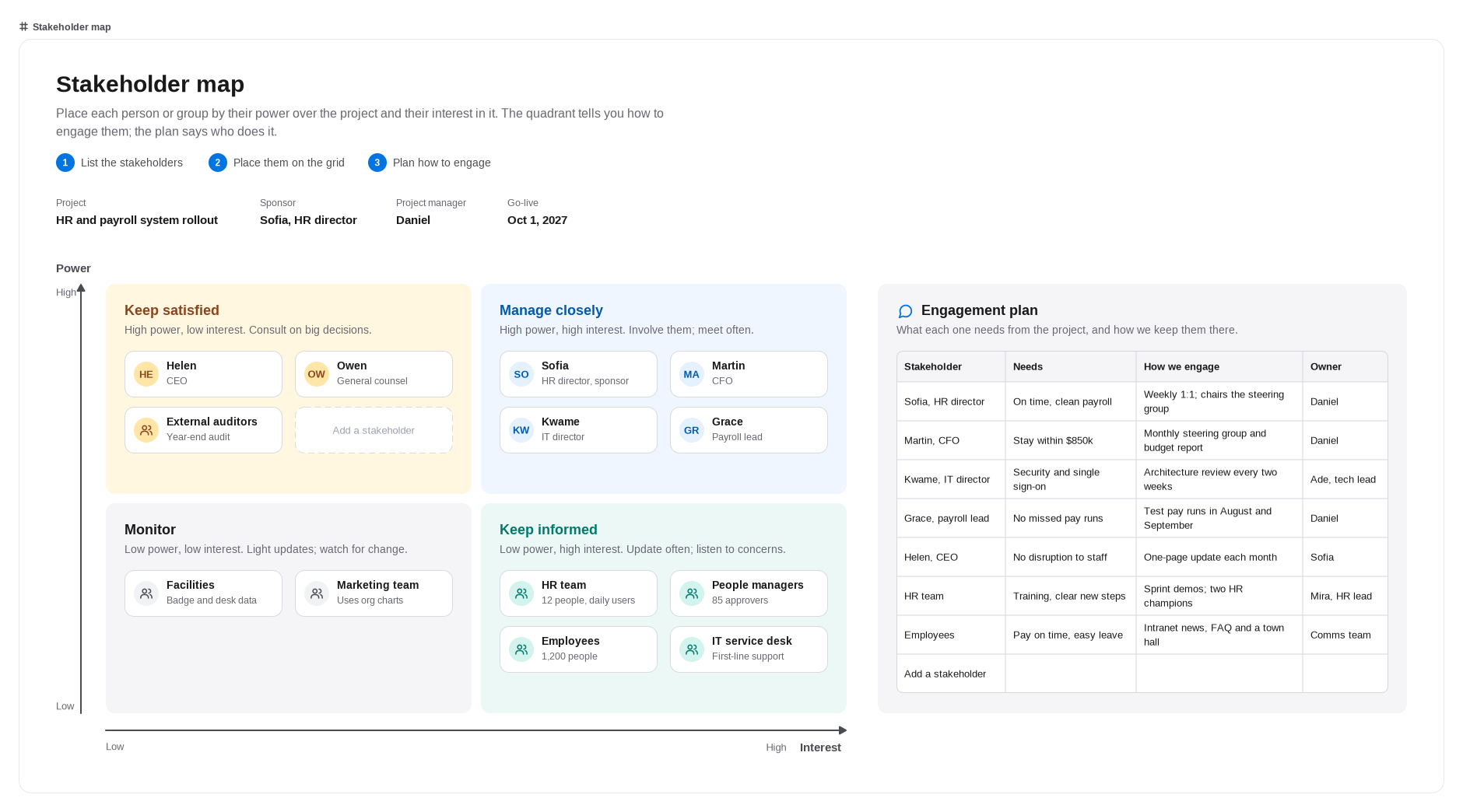
This template has the grid and, beside it, an engagement plan that turns positions into actions. The example is “HR and payroll system rollout”: Sofia, the HR director, is the sponsor, Daniel is the project manager and go-live is Oct 1, 2027.
The power and interest grid
Power runs up the side from low to high. Interest runs along the bottom from low to high. That gives four quadrants, and each one states its own rule under its title:
- Manage closely. “High power, high interest. Involve them; meet often.”
- Keep satisfied. “High power, low interest. Consult on big decisions.”
- Keep informed. “Low power, high interest. Update often; listen to concerns.”
- Monitor. “Low power, low interest. Light updates; watch for change.”
Each stakeholder is a small card with initials or an icon, a name and one line of context. The example places Helen, the CEO, under Keep satisfied: she could stop the project with a sentence, but payroll software is not on her mind.
Power is not the same as rank
Look at who sits under Manage closely. Sofia is there as sponsor, Martin as CFO and Kwame as IT director. The fourth card is Grace, the payroll lead. She is not an executive, but she runs the pay runs the new system must get right, and if she says it is not ready, it is not ready.
Judge power by what a person can do to this project, not by their title. Ask who can approve it, who can stop it and whose work it cannot go live without. Judge interest by how much their own days will change.
Groups count too
The bottom row of the grid is mostly groups, each with a number or a reason on its card. Under Keep informed: “HR team, 12 people, daily users”, “People managers, 85 approvers”, “Employees, 1,200 people” and the IT service desk as first-line support. None of them can cancel the project. All of them will live with it, and a rollout that surprises 1,200 people fails however good the software is.
Monitor holds two quiet ones: Facilities, which supplies badge and desk data, and the marketing team, which uses the org charts. They need little today. They stay on the map because positions move, and a group nobody watched can turn into a blocker late in the project.
The engagement plan
A grid alone changes nothing. The table on the right gives the stakeholders who matter most a row with four columns: who, what they need, how you engage them and who owns the relationship.
Needs are written the way the person would say them. Martin, the CFO: “Stay within $850k”, met with a monthly steering group and budget report. Grace: “No missed pay runs”, met with test pay runs in August and September. Employees: “Pay on time, easy leave”, met with intranet news, an FAQ and a town hall.
The owner column is not always the project manager. Helen’s one-page monthly update is owned by Sofia, because a CEO hears a sponsor better than a project team.
How to use the stakeholder map template
- Get your own copy. Use this template opens the rollout example as a board you can change.
- List the stakeholders. Write a card for every person or group that approves, pays, builds, uses or is affected. Add a line of context, like a headcount.
- Place them on the grid. For each card ask the two questions, power and interest, and drag it into its quadrant. The dashed “Add a stakeholder” card shows the format.
- Plan how to engage. Give everyone in the top row and the right column a line in the table: a need, a regular contact and an owner.
Look at the map again after every big change to the project. People move between quadrants.
When to map stakeholders, and what to pair it with
Map them at the start of any project that changes how other people work, and before a decision that needs backing from outside the team.
The map covers relationships, not tasks. To assign work and sign-offs inside the team, use a RACI matrix. To schedule every update, channel and sender across the project, extend the engagement table into a communication plan. The sponsor and the key names also belong in the project charter.
Questions about the Stakeholder map template
What is the difference between a stakeholder map and a RACI matrix?
A stakeholder map looks outward: it ranks everyone around the project by power and interest and plans how to keep them on side. A RACI matrix looks inward: it assigns each task to the people who do it, approve it, advise on it or hear about it.
How do I decide how much power a stakeholder has?
Ask what happens if they say no. Someone who controls the budget, the approval, a system you depend on or a team you need has high power. Seniority is a hint, not the answer: a payroll lead can outweigh a director on a payroll project.
Should I share the stakeholder map with the stakeholders?
Share the engagement plan freely, since it only promises updates and meetings. Be careful with the grid itself. Few people enjoy seeing their name under low power or low interest, so most teams keep the grid inside the project team.
Is the stakeholder map template free?
Yes. It has 104 elements, well inside the 150 a Free board allows, so you can add many more cards. One person edits on the Free plan, and the people you share the board with can view it and comment.