What is a cross-functional flowchart?
A cross-functional flowchart is a flowchart drawn on a grid. The columns, called lanes, are the people or teams who do the work. The rows are the phases the work passes through. Every step sits in the lane of whoever does it, so the diagram shows the process and the responsibility at the same time.
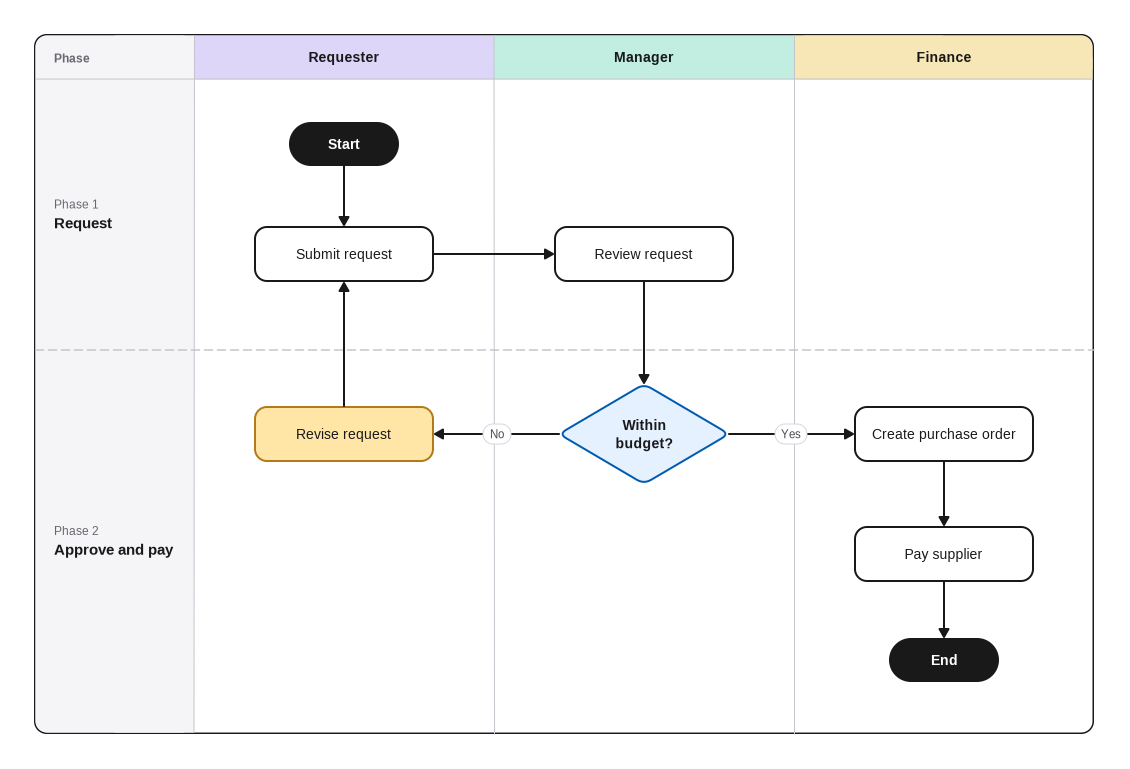
The template maps a purchase request. It has three lanes, Requester, Manager and Finance, and two phases, Request and Approve and pay. A start, an end, five steps and one decision are already placed and connected.
Lanes: one column per role
The header row names the three lanes. Read down a lane and you see everything one role does: the Requester submits and, if needed, revises; the Manager reviews and decides; Finance creates the purchase order and pays.
Read along the arrows instead and you see the handoffs. Each time an arrow crosses a lane border, work passes from one person to another. Submit request to Review request is the first handoff here. Those crossings are where requests wait in inboxes, so they are the first place to look when a process is slow.
Phases: rows that mark progress
The narrow column on the left labels the rows. Phase 1 is Request and Phase 2 is Approve and pay. A phase line is a milestone: the work above it comes before the work below it.
Phases add a second reading to the grid. Any cell answers two questions at once. Revise request sits in the Requester lane and in Phase 2, which tells you that a revision happens after the manager has looked, and that it is the requester’s job to do it.
If your process has no clear stages, delete the phase column and you have an ordinary swimlane diagram.
Give every decision an owner and two labeled exits
The diamond Within budget? sits in the Manager lane. That placement matters as much as the question: it says who has the authority to answer. A decision that straddles two lanes is a decision nobody owns.
Both exits are labeled. Yes leads right, into Finance, to Create purchase order. No leads left, back to the Requester, to Revise request, and from there the arrow returns to Submit request. Draw the No path with the same care as the Yes path. In most real processes the rework loop is where the time goes, and a chart that hides it flatters the process.
How to use the cross-functional flowchart template
- Open it as a new board. Use this template copies the purchase request example into your workspace, lanes and phases included.
- Rename the lanes. Replace Requester, Manager and Finance with the roles in your process. Use roles, not people’s names, so the chart survives a reorganization.
- Name the phases. Change Request and Approve and pay to the stages your work goes through. Two to four is typical.
- Place each step in its cell. Write the step as verb plus object, then drag it into the lane of whoever does it and the phase where it happens.
- Count the border crossings. Trace the arrows and mark each lane change. Ask of each one whether the handoff is needed or just habit.
You can also describe the process in a sentence or two and let FlowDraw AI draw a first version to rearrange.
When to use it, and what to use instead
Reach for it when a process crosses team lines and people disagree about who does what: approvals, onboarding, order handling, incident handling. It makes handoffs and waiting points visible in a way a list of steps cannot.
If one person or one team does everything, lanes add nothing, and a plain flowchart is easier to read. If you want lanes without phases, start from the swimlane template. If the question is only who is responsible, consulted and informed for each task, a RACI matrix answers it in a table. The post handoffs hide the delays explains what to look for once the chart is drawn.
Questions about the Cross-functional flowchart template
Is a cross-functional flowchart the same as a swimlane diagram?
Nearly. Both place steps in lanes by role. The name cross-functional flowchart usually means the grid also has phases at right angles to the lanes, as this template does with Request and Approve and pay. Without the phase bands it is a swimlane diagram.
Should the lanes run down or across?
Either works. This template uses vertical lanes with the flow running top to bottom, which suits processes with few roles and many steps. Horizontal lanes suit long role names and wide screens. Pick one direction and keep it for every chart in the same document.
How many lanes can one chart have?
Three to six read well. Beyond that the arrows cross too many borders to follow. If you have more roles, group the ones that always act together into one lane, or split the process into two charts at a phase line.
Is this template free to use?
Yes. It opens on the Free plan and fits well inside the limit of 150 elements on a board. One person edits on the Free plan, and anyone you share the board with can view it and comment on the steps.