What is a team health check?
A team health check is a regular self-assessment. The team rates how it is doing in a fixed set of areas, such as speed, quality, fun and support, using traffic lights. It is not a performance review and nobody outside the team scores anything. The purpose is to make the team’s own view of itself visible, spot what is getting worse, and choose where to act. The format became popular with software squads and works for any team that stays together for more than a few months.
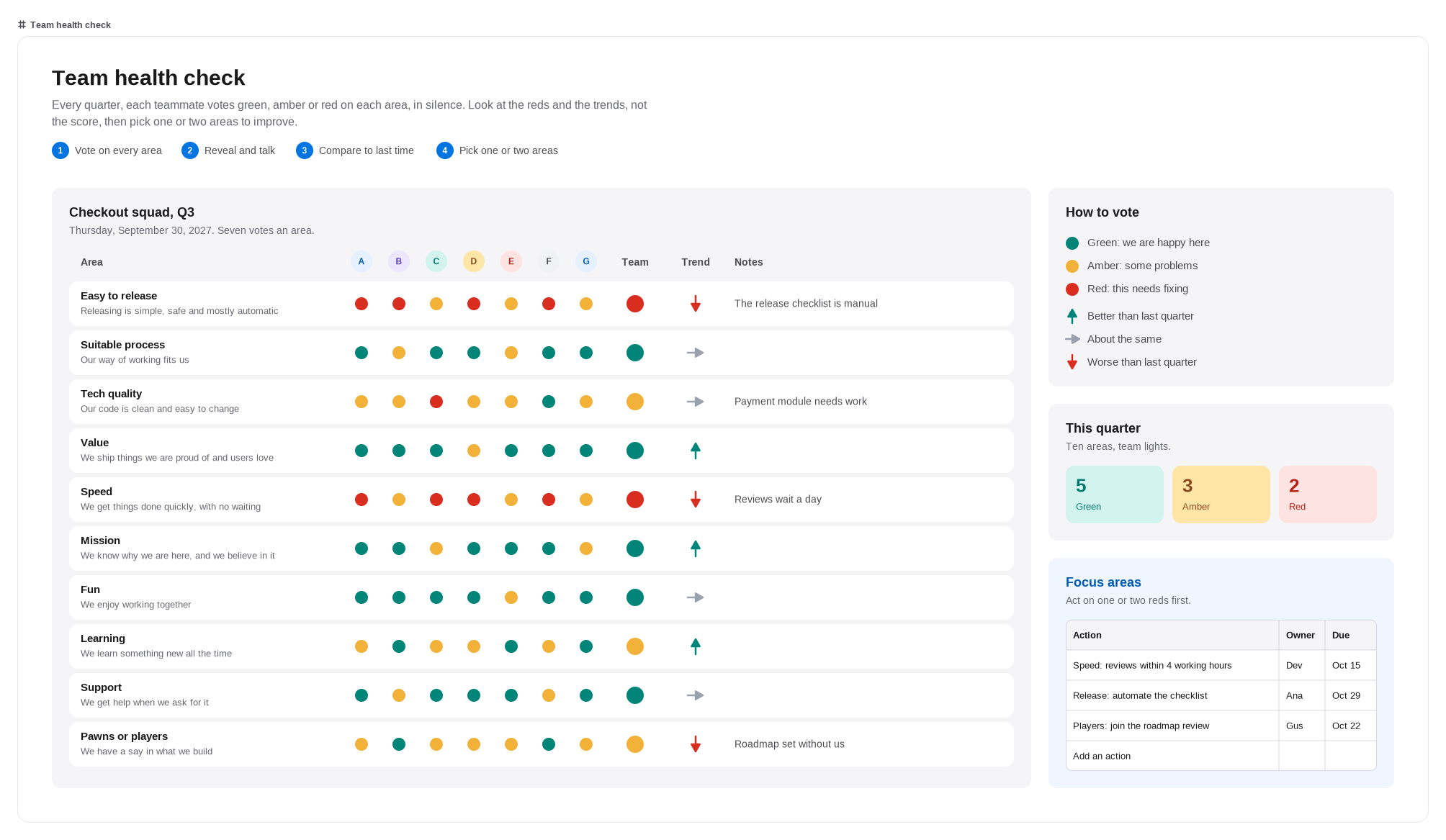
This template is a voting grid with ten areas, a key, a count for the quarter and a short action table. The example is the Checkout squad’s Q3 check on Thursday, September 30, 2027.
Ten areas, one row each
The grid has a row for every area. Each row gives the area a short name and a sentence that describes what good looks like, so a vote means the same thing to everyone. The ten on the board are:
- Easy to release. Releasing is simple, safe and mostly automatic.
- Suitable process. Our way of working fits us.
- Tech quality. Our code is clean and easy to change.
- Value, Speed, Mission, Fun, Learning and Support, each with its own sentence.
- Pawns or players. We have a say in what we build.
Across the top sit seven initials, A to G, one column per teammate, followed by columns for the team’s light, the trend and notes.
How to vote: three lights and a trend
The key at the top right defines the three votes in the team’s own words. Green: we are happy here. Amber: some problems. Red: this needs fixing. Nobody has to defend a number from 1 to 10 this way. You only decide which of three sentences is true for you.
The lower half of the key covers the trend column: better than last quarter, about the same, or worse than last quarter. Trend is often the more useful signal. An amber area that was red three months ago is good news, and a green one that is slipping deserves a question before it turns.
Read the rows, not the score
The board’s own instruction is to look at the reds and the trends, not the score. Compare three neighboring rows in the example. Value has six green votes and one amber: the squad is proud of what it ships. Mission is also green. Between them, Speed has four red votes and three amber, a red team light and a note that explains it in four words: “Reviews wait a day”.
The note column is where a color becomes something you can fix. “Easy to release” is the other red row, with the note “The release checklist is manual”. Write the note during the conversation, in the words people used, and keep it short enough to fit the cell.
The count for the quarter
A small panel sums up the team lights across all ten areas: 5 green, 3 amber, 2 red. It is a headline, useful for comparing one quarter with the next and for telling a manager how the check went without sharing individual votes.
Treat it with care. Two teams with the same count can be in very different places, and a team that votes honestly will often show more red than one that does not feel safe. Never set a target for the count. The moment green becomes a goal, people vote green.
Pick one or two areas and act
The last panel, Focus areas, says “Act on one or two reds first.” The squad’s two red rows each get an action. For Speed: reviews within 4 working hours, owned by Dev, due October 15. For releasing: automate the checklist, owned by Ana, due October 29. A third row addresses an amber area with a pointed note, “Roadmap set without us”: the squad will join the roadmap review.
Each action starts with the area’s name, which ties it back to a row in the grid. Next quarter, those are the rows to check first. If the lights did not move, the action was the wrong one or it was not done.
How to use the team health check template
This board holds 179 elements, more than a Free board’s limit of 150, so opening it needs the Pro or Team plan.
- Open it as a new board. Replace the initials with your team’s, remove or add voter columns, and reset every dot to a neutral color.
- Vote on every area. Read one description aloud, give people ten seconds, then color the dots. Voting in silence and revealing together keeps the first voice from leading.
- Reveal and talk. Set the team light to the most common vote and discuss the rows with red in them. Fill the notes column.
- Compare to last time. Mark each row’s trend against the previous quarter’s board.
- Pick one or two areas. Write the actions with owners and dates.
When a health check helps, and when to use another format
Run it every quarter with a stable team of four to ten people. It is most valuable the third and fourth time, when trends appear.
It does not replace the regular retrospective, which looks at one sprint’s events; for that, use start stop continue or a starfish retrospective. For a quick weekly read on mood and energy, the team check-in takes five minutes where this takes an hour.
Questions about the Team health check template
How often should a team run a health check?
Every quarter is the rhythm printed on this board and a good default. Monthly leaves too little time for actions to show an effect, and yearly is too rare to see trends. Keep the same areas each time so quarters can be compared.
Should votes be anonymous?
The example shows initials, which suits a team with enough trust to discuss differences openly. If people hold back, drop the initials and number the columns. An honest anonymous red is worth more than a polite green with a name on it.
Can we change the ten areas?
Yes. Rename any row and rewrite its description to fit your work: a support team might swap “Easy to release” for response quality. Keep the list to around ten and avoid changing it every quarter, or the trend column loses its meaning.
Should managers see the results?
Share the count and the focus actions, and let the team decide about the rest. The check belongs to the team. If it is used to rank teams or judge people, votes turn green and the exercise stops telling the truth.
Which plan do I need for this template?
Pro or Team. The board has 179 elements and a Free board holds up to 150. On the Team plan every teammate can color their own dots at the same time; on Pro one person edits while the others view and comment.