What is a user story map?
A user story map arranges a backlog in two directions. From left to right it follows what the user does, in order. From top to bottom it ranks the stories under each step, most needed first. Jeff Patton popularized the method as a cure for the flat backlog, where a list of tickets hides the journey they belong to.
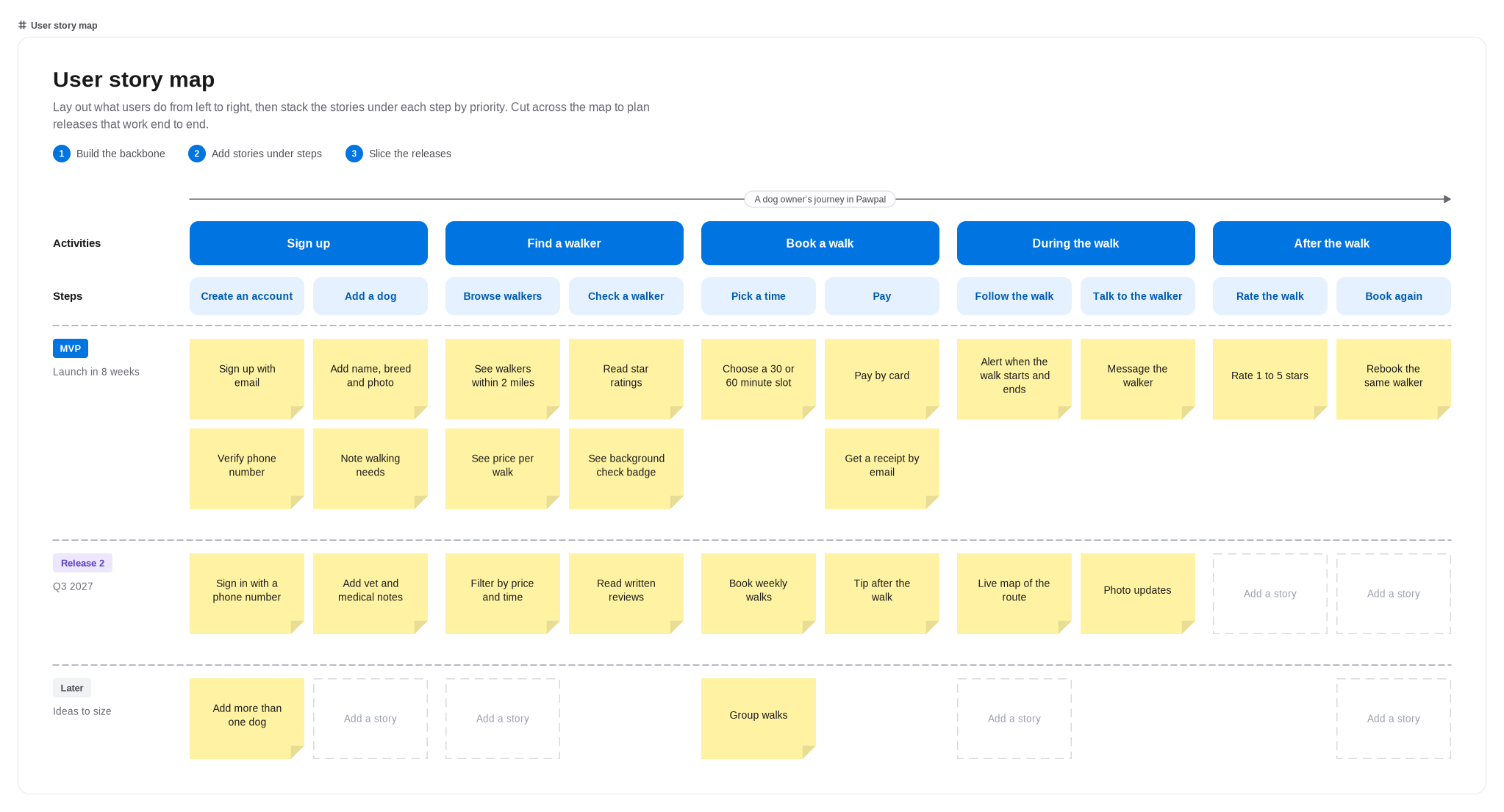
This template maps a dog-walking app. An arrow across the top names the journey of a dog owner, the backbone runs under it, and sticky notes fill three horizontal bands: MVP, Release 2 and Later.
The backbone: activities and steps
The top two rows are the backbone. Activities are the big things a person sets out to do. The example has five: Sign up, Find a walker, Book a walk, During the walk and After the walk. Under each activity sit two steps, the smaller tasks that make it up. Sign up breaks into “Create an account” and “Add a dog”. Find a walker breaks into “Browse walkers” and “Check a walker”.
Write the backbone with verbs and keep it free of features. It should still be true if you rebuilt the product from scratch.
Stories under each step
Every sticky note is a story, and it hangs under the step it serves. Under “Pick a time” the first story is “Choose a 30 or 60 minute slot”. Under “Pay” come “Pay by card” and “Get a receipt by email”. Under “Follow the walk” the first story is a plain one: “Alert when the walk starts and ends”.
Read the top band across and you get a product that works from start to finish. An owner can sign up, find a walker within 2 miles, book, pay, hear that the walk happened and rate it 1 to 5 stars. That is the point of the MVP band, which the example plans to launch in 8 weeks: thin, but complete.
Slice the map into releases
The lines that cut across the map are release slices. Below the MVP sits Release 2, dated Q3 2027. It deepens steps that already work: “Filter by price and time” improves browsing, “Live map of the route” replaces the simple alert, and “Book weekly walks” builds on the single booking.
The last band, Later, is labelled “Ideas to size”. It holds “Add more than one dog” and “Group walks”, stories nobody has estimated yet. The dashed “Add a story” cards mark steps with nothing planned for that slice, which is a fair answer too.
How to use the user story map template
- Make your own copy. Choose Use this template and the dog-walking map opens as a board you can edit.
- Build the backbone. Rename the five activities to match your user’s journey, then write the steps under each. Add or remove columns as needed.
- Add stories under steps. Put one story on each note and stack them with the most needed at the top.
- Slice the releases. Drag notes above or below the lines until the top band is the smallest set that works end to end. Give each band a name and a date.
Walk the top band aloud as if you were the user. Any step where you get stuck is missing a story.
When to map stories, and when to pick another board
Map stories at the start of a product or a large feature, when the team needs to agree on scope and on what ships first. It also helps when a backlog has grown so long that nobody can say what the next release adds up to.
The map describes what to build, not how users feel along the way. For feelings and pain points, draw a user journey map first. When the slices are agreed and work begins, move the MVP stories to a scrum board. If the argument is about which stories are essential at all, MoSCoW prioritization settles it with sizes and a capacity limit.
Questions about the User story map template
What is the backbone of a user story map?
The backbone is the row of activities and steps across the top. It describes what the user does in order, without naming features. Every story on the map hangs under one step of the backbone.
How is a story map different from a backlog?
A backlog is one ranked list. A story map keeps the same stories but places each under the user step it supports, so you can see gaps in the journey and plan releases that work from the first step to the last.
How many stories belong in the MVP slice?
As few as it takes to cover every step once. In the example the MVP has fifteen stories for ten steps. If a step has four stories in the top band, some of them can probably wait for the next slice.
Can several people work on the map at once?
On the Team plan, several people edit the same board at the same time, which suits a mapping workshop. On Free and Pro, one person edits while others view the board and leave comments.