What is a scrum board?
A scrum board shows the work of one sprint. Every story the team took on is a card, and the card moves from left to right as the work advances. Anyone who looks at the board can tell what is finished, what is being worked on and what has not started.
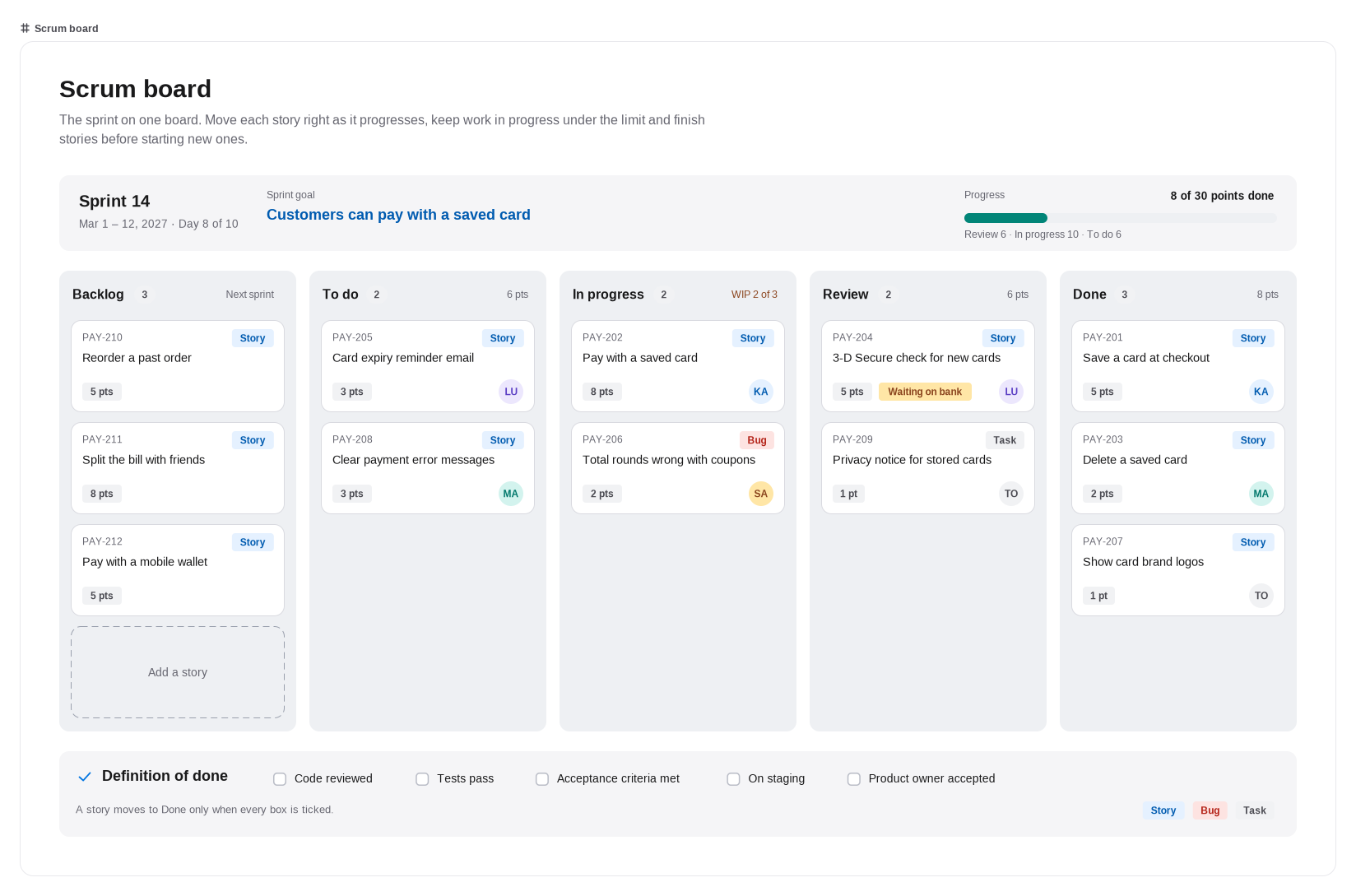
This template is a board for Sprint 14 of a made-up payments team. It has five columns, a strip on top with the sprint goal and the points done so far, and a strip at the bottom with the definition of done. Twelve cards are already in place, so you can see how a sprint looks in its second week before you load your own.
Five columns, read from left to right
Each column is a state a story can be in, and each column head counts what it holds.
- Backlog. Three stories marked “Next sprint”, such as “Split the bill with friends” at 8 points. They wait here so nobody starts them by accident.
- To do. Committed for this sprint and not started: 2 cards, 6 points.
- In progress. Someone is working on it now. The head reads “WIP 2 of 3”.
- Review. Built and waiting for a check: 2 cards, 6 points.
- Done. Three cards, 8 points, from “Save a card at checkout” to “Show card brand logos”.
The dashed card under the backlog, “Add a story”, is the place for the next one.
The sprint goal comes first
The strip above the columns names the sprint, its dates and its goal: Sprint 14, Mar 1 to 12, 2027, “Customers can pay with a saved card”. The goal is one sentence a customer would understand. It is the test for every card on the board: does finishing this story bring the goal closer?
Beside the dates the strip says “Day 8 of 10”. Change it at the start of each daily meeting. A team that knows it is on day 8 looks at the right-hand columns differently from a team on day 2.
What goes on a card
A card holds five things: a key (PAY-202), a type tag, a title, an estimate in points and the initials of the person doing it. That is enough to talk about the story in a daily meeting without opening anything else.
Look at the two middle columns. “Pay with a saved card” is 8 points and belongs to KA. “Total rounds wrong with coupons” is tagged Bug, not Story, so the team can see how much of the sprint goes to repairs. In Review, the card for the new-card security check carries one more tag: “Waiting on bank”. A blocked card should say what it waits for, right on the card.
The work-in-progress limit is the number that keeps this honest. With a limit of 3 and two cards in progress, one more story may start. At three, the team helps finish a card before anyone pulls a new one.
A card is done when every box is ticked
The strip at the bottom lists the team’s definition of done: code reviewed, tests pass, acceptance criteria met, on staging, product owner accepted. Under it the board says “A story moves to Done only when every box is ticked.”
Write your own five. Keep them to things you can check in a minute, and keep them on the board, where the argument about “nearly done” ends quickly. The three tags at the right of the strip, Story, Bug and Task, are the key to the card types.
How to use the scrum board template
- Open it as a new board. Use this template copies the board into your workspace with the payments sprint still on it.
- Write the sprint strip. Replace the sprint number, the dates and the goal, and set the work-in-progress limit your team agreed on.
- Load the To do column. Retype the example cards with the stories you committed to, each with its points and the initials of whoever takes it.
- Move cards in the daily meeting. Start from the Done column and work leftwards, so the talk is about finishing.
- Update the progress line. Add up the points per column by hand and retype the totals. The example reads “8 of 30 points done” with 10 points in progress.
If you are choosing how to run sprints as well as where to draw them, the scrum tool page shows the other boards a sprint uses.
When a scrum board fits, and what to use beside it
Use it when the team works in sprints with a fixed length and a goal. The board answers one question, “where is this sprint right now?”, and it resets when the sprint ends.
It does not decide what goes into the sprint. That happens on the sprint planning board, where capacity and commitment are worked out, and the stories come from a ranked product backlog. If work arrives all the time and there are no sprints, a kanban board without dates and points is the simpler choice.
Questions about the Scrum board template
What is the difference between a scrum board and a kanban board?
A scrum board belongs to one sprint: it has a goal, an end date and a fixed set of stories, and it is cleared when the sprint closes. A kanban board has no sprints. Work flows through it all the time and only the limits per column hold it back.
How do I choose a work-in-progress limit?
Start with one card per developer, minus one. The example uses 3. If cards pile up in Review, lower the limit; if people wait with nothing to do, raise it by one and watch a sprint.
Should the backlog column be on a sprint board?
A short one helps. The example keeps three stories marked for the next sprint, so the team can see what is coming and pull one in if the sprint finishes early. The full ranked list belongs on a product backlog.
Is the scrum board template free?
Yes, it opens on the Free plan. The board has 121 elements and a Free board holds up to 150, so a sprint with many more cards needs the Pro plan. On the Team plan the whole team moves cards at once.