What is a weekly team sync?
A weekly team sync is the one meeting in the week where the whole team looks at the same things together: what went well, where the numbers stand, what matters most in the days ahead and what might get in the way. It replaces a round of status updates with a fixed order that everyone knows.
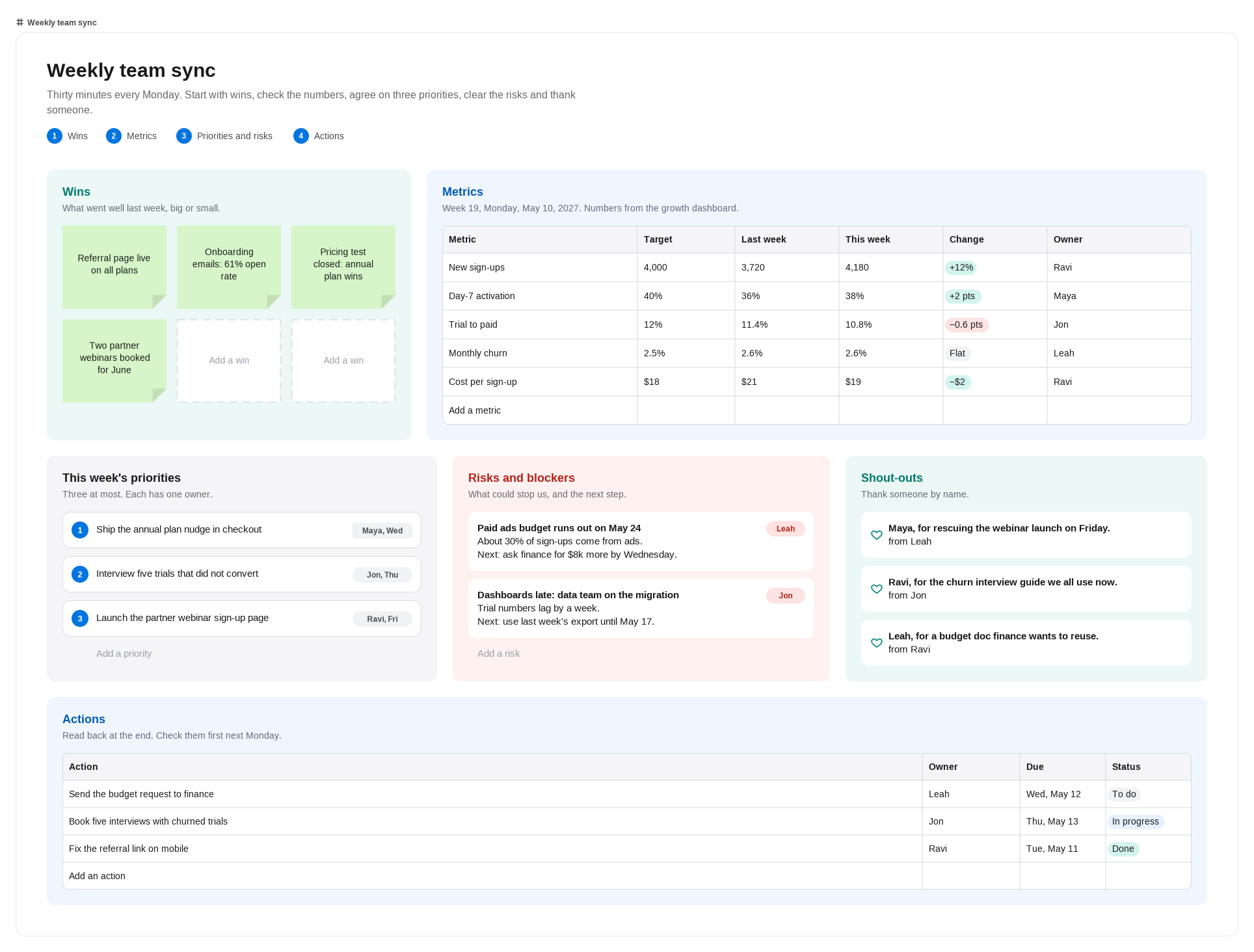
This template is that order, drawn as six cards. The instruction on the board reads “Start with wins, check the numbers, agree on three priorities, clear the risks and thank someone.” The example is a growth team, Ravi, Maya, Jon and Leah, meeting on Monday, May 10, 2027.
Start with wins
The Wins card opens the meeting with “What went well last week, big or small.” The growth team posted four notes: “Referral page live on all plans”, “Onboarding emails: 61% open rate”, “Pricing test closed: annual plan wins” and “Two partner webinars booked for June”.
Wins come first for a practical reason. They are quick, everyone has one, and they tell the team what shipped before the numbers are read. A win with a figure in it, like the 61% open rate, is worth more than “emails went well”. Two empty cards marked “Add a win” wait for late additions.
Check the numbers in one table
The Metrics table is the widest card in the top row. Its columns are Metric, Target, Last week, This week, Change and Owner, and the line above it says where the figures come from: “Numbers from the growth dashboard.”
Five rows are enough. In week 19, new sign-ups reached 4,180 against a target of 4,000, up 12%. Day-7 activation rose from 36% to 38%, still short of 40%. Trial to paid slipped from 11.4% to 10.8%, under its 12% target. Monthly churn stayed flat at 2.6%, and cost per sign-up fell from $21 to $19.
Target and Owner are the columns that make this a meeting tool. The target shows at once which rows need talk, and the owner is the person who explains a change. Here Jon speaks to trial to paid, the one number moving the wrong way.
Agree on three priorities
This week’s priorities comes with a limit: “Three at most. Each has one owner.” The example lists “Ship the annual plan nudge in checkout” for Maya by Wednesday, “Interview five trials that did not convert” for Jon by Thursday and “Launch the partner webinar sign-up page” for Ravi by Friday.
Read them against the first two cards. The pricing test showed the annual plan wins, so priority one puts it in checkout. Trial to paid fell, so priority two goes and asks why. Good priorities follow from the wins and numbers the team has just looked at. If one comes from nowhere, ask what it is for.
Give every risk a next step
The Risks and blockers card asks for “What could stop us, and the next step.” Each entry has a headline, the reason it matters, a next step and a name tag.
The first reads “Paid ads budget runs out on May 24”. Why it matters: “About 30% of sign-ups come from ads.” Next: “ask finance for $8k more by Wednesday.” Leah owns it. The second is “Dashboards late: data team on the migration”, with the workaround “use last week’s export until May 17”.
A risk without a next step is only a worry. Writing the step on the card is what lets the team move on after a minute.
Thank someone by name
The last card before actions is Shout-outs, and its rule is “Thank someone by name.” Three are filled in. Leah thanks “Maya, for rescuing the webinar launch on Friday.” Jon thanks “Ravi, for the churn interview guide we all use now.” Ravi thanks “Leah, for a budget doc finance wants to reuse.”
Each one names a person and the specific thing they did, and says who it is from. It takes a minute, and it makes good work visible to the whole team.
How to use the weekly team sync template
- Open it as a new board. Use this template saves a copy of the six cards to your workspace. Replace the five metrics with the ones your team is measured on.
- Fill wins and metrics before the meeting. Owners update their rows and add their notes, so the meeting starts with reading, not typing.
- Agree on priorities and risks together. This is where most of the thirty minutes should go.
- Read the actions back. The Actions table has Action, Owner, Due and Status. In the example Leah will “Send the budget request to finance” by Wed, May 12.
- Reuse the board next Monday. Copy the This week column into Last week, clear the wins, and check the old actions first.
When a weekly sync fits, and when it does not
This format suits a team with shared numbers and separate work: growth, marketing, sales, operations. Once a week is enough for people to stay in step without meeting every day.
A team that builds one thing together in sprints usually needs a shorter, daily rhythm: see the daily stand-up. For a company-wide update, use the all-hands agenda. And if the numbers deserve a board of their own, the KPI dashboard has room for charts.
Questions about the Weekly team sync template
How long should a weekly team sync be?
Thirty minutes is the length this template is built for. Wins and metrics take about ten, priorities and risks about fifteen, and shout-outs and actions the last five. If it regularly runs long, the metrics are probably being debated when they should only be read.
Which metrics belong in the table?
Five or so that the team can move and that have a target. The example uses new sign-ups, day-7 activation, trial to paid, monthly churn and cost per sign-up. Leave out numbers nobody on the team owns.
What is the difference between a priority and an action?
A priority is one of the three outcomes the team wants by Friday, such as launching the webinar sign-up page. An action is a small task agreed in the meeting, with a due date and a status, such as sending a budget request to finance.
Is the weekly team sync template free?
Yes. The template opens on the Free plan, where one person edits the board and the people it is shared with can view and comment. On the Team plan, everyone updates their own rows and notes at once.