What is a daily stand-up?
A daily stand-up is a short team meeting held at the same time every day. Each person says what they finished, what they will do next and what is in their way. It is for the team to line up the day’s work, not for reporting to a manager. Scrum calls the same meeting the daily scrum.
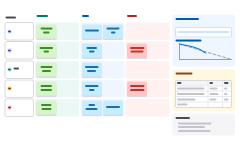
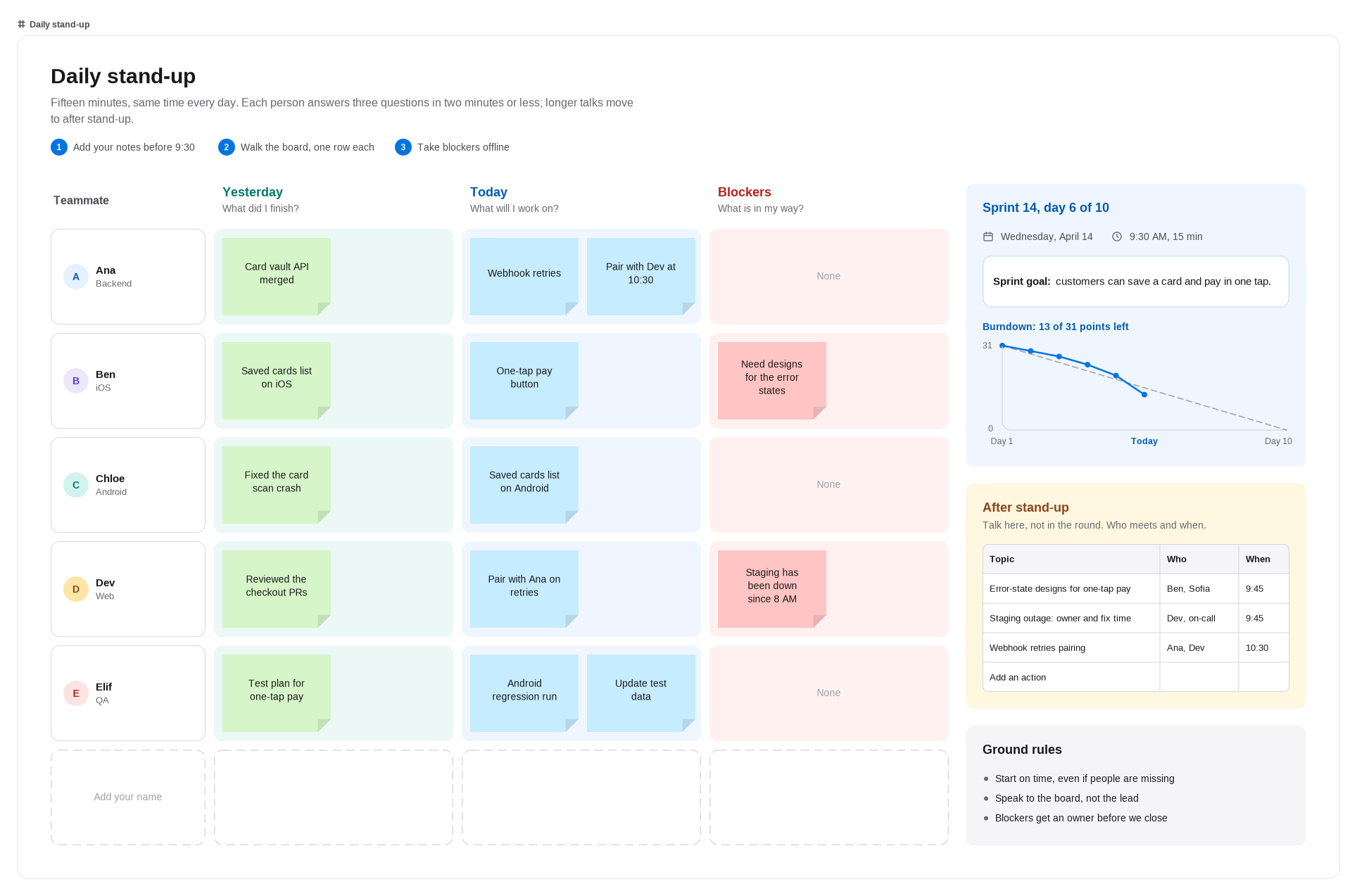
This template is the board the team looks at while it talks. A grid holds one row for each teammate, and three cards on the right hold the sprint’s state, the talks that happen afterwards and the ground rules. The example is a five-person team building saved cards and one-tap payment, on Wednesday, April 14.
Three questions, one row each
Each column asks one question under its title:
- Yesterday: “What did I finish?” Ana’s note reads “Card vault API merged”.
- Today: “What will I work on?” Ana has two notes: “Webhook retries” and “Pair with Dev at 10:30”.
- Blockers: “What is in my way?” Ana’s cell says “None”.
The first column names the teammate and their role, so a row reads like one person speaking. Ben’s row, right below, ends differently: his blocker is “Need designs for the error states”. The line of text above the board sets the pace: fifteen minutes in all, two minutes or less per person.
Write notes the team can act on
Look at Dev’s row. Yesterday: “Reviewed the checkout PRs”. Today: “Pair with Ana on retries”. Blocker: “Staging has been down since 8 AM”. Each note is a few words, names a real thing, and can be checked tomorrow.
Two habits show in the example. “Yesterday” lists what was finished, not what was touched, so “Fixed the card scan crash” counts and “worked on the crash” would not. And an empty blocker cell is written out as “None”, as in Elif’s row, so nobody has to guess whether the cell was skipped.
Blocker notes are red, while the other two columns use green and blue. A scan down the red column is the fastest way to see who needs help.
Move long talks to After stand-up
The round stays short because nothing gets solved in it. The After stand-up card carries the rule “Talk here, not in the round. Who meets and when.” Its table has three columns: Topic, Who and When.
In the example every blocker became a row. Ben’s missing designs turned into “Error-state designs for one-tap pay” with Ben and Sofia at 9:45. Dev’s outage turned into “Staging outage: owner and fix time” with Dev and the on-call engineer, also at 9:45. Only the people named stay. Everyone else goes back to work at 9:45.
Keep the sprint goal in sight
The card at the top right reads “Sprint 14, day 6 of 10”, with the date and “9:30 AM, 15 min”. Under it is the sprint goal: “customers can save a card and pay in one tap.” Updates that do not serve that sentence are a signal worth raising.
A small burndown chart shows “13 of 31 points left” and marks today on the line from Day 1 to Day 10. Change the number and add a dot before each stand-up. It takes a few seconds and answers the question behind every update: are we on track?
How to use the daily stand-up template
- Open it as a new board. Use this template puts a copy of the grid in your workspace. Rename the rows for your team and use the “Add your name” row for a sixth person.
- Add your notes before 9:30. Whatever your start time is, notes go on the board before it, so the meeting is for listening.
- Walk the board, one row each. Go top to bottom. The person whose row it is speaks, and the next row starts when they stop.
- Take blockers offline. When an update turns into a discussion, add a row to After stand-up and move on.
- Clear yesterday’s notes. At the end, move each Today note that got done into Yesterday, ready for tomorrow.
When a stand-up helps, and when it does not
A daily stand-up pays off when people work toward one shared goal and depend on each other’s work day to day, as a sprint team does. Seven rows at two minutes each fill the fifteen minutes.
If your team’s work is mostly independent, meeting daily adds little: a weekly team sync covers wins, numbers and priorities in one go. To track the tickets themselves, pair this board with a scrum board, and for a full-size version of the chart use the burndown chart.
Questions about the Daily stand-up template
How long should a daily stand-up take?
Fifteen minutes, whatever the team size. The template asks each person to answer in two minutes or less, and anything longer moves to the After stand-up table, where only the people involved stay on.
What counts as a blocker?
Anything that stops your work and that you cannot remove alone today: a missing design, a broken environment, a review nobody has picked up. In the example, a staging outage and missing error-state designs are blockers. Being busy is not one.
Who should run the stand-up?
Nobody needs to lead it. One of the ground rules on the board is to speak to the board, not the lead. Go down the rows in order, each person speaking for their own row, and the meeting runs without a chair.
Can a remote team use this board?
Yes. Share the board and keep it on screen during the call. On the Team plan everyone adds their own notes at the same time. On the Free and Pro plans one person edits, and teammates can view the board and comment.