What is a group project plan?
Group projects go wrong in familiar ways: nobody knows who is doing what, one person does everything, and the problems appear the night before the deadline. A group project plan prevents that by putting four things in writing on day one: who has which role, what the tasks are, when each stage is due and how the team will keep in touch.
This template holds all four on one board. The example is a Grade 8 science team of four, Ana, Ben, Kim and Raj, working on the question “Is Mill Creek healthy?” The board is dated Monday, March 15, 2027, partway through the project, so you can see what a plan looks like in use.
The brief and the team rules
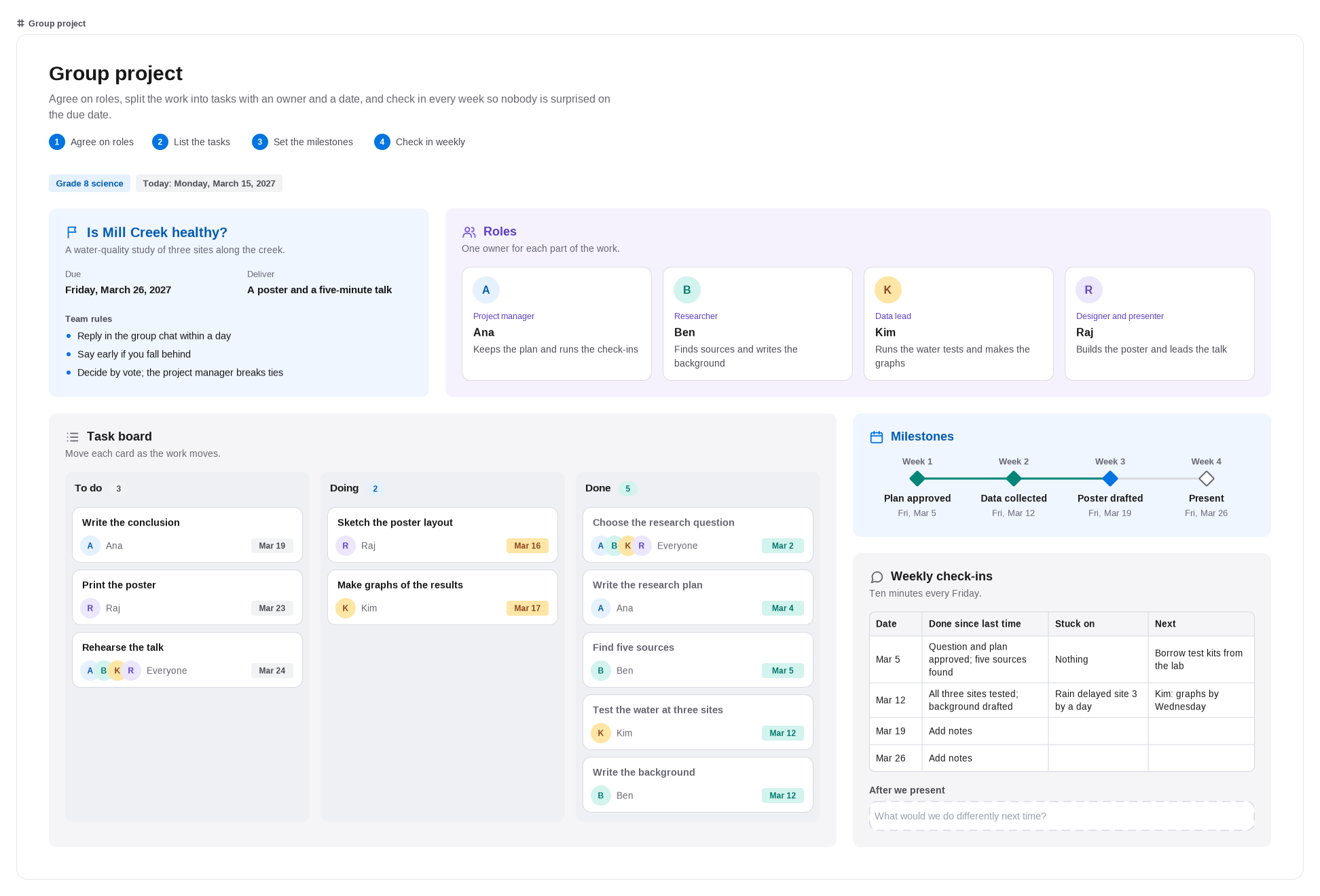
The top left card states the project in a few lines. Title: “Is Mill Creek healthy?” Description: “A water-quality study of three sites along the creek.” Due: Friday, March 26, 2027. Deliver: “A poster and a five-minute talk”. Writing down the deliverable sounds obvious, yet teams regularly discover in the last week that half of them planned slides and half a poster.
Under it are three team rules:
- Reply in the group chat within a day
- Say early if you fall behind
- Decide by vote; the project manager breaks ties
Three rules are enough. Each one answers a problem before it happens: silence, hidden delays and arguments that never end. Have the team write its own instead of copying these, because people keep rules they chose.
Roles: one owner for each part
The Roles row carries the line “One owner for each part of the work” and four cards. Each has a role, a name and a sentence that says what the role does:
- Project manager, Ana. Keeps the plan and runs the check-ins.
- Researcher, Ben. Finds sources and writes the background.
- Data lead, Kim. Runs the water tests and makes the graphs.
- Designer and presenter, Raj. Builds the poster and leads the talk.
A role is not a wall. Everyone still helps, but when a part of the work slips, the team knows who was meant to notice. The sentence under each name is what makes the role real: “Data lead” alone could mean anything, while “runs the water tests and makes the graphs” is a job somebody can be asked about.
The task board
The largest area is a board with three columns, To do, Doing and Done, under the instruction “Move each card as the work moves.” A count beside each column title shows 3, 2 and 5. Every card has a task, the initials and name of its owner, and a date.
On March 15 the Done column holds five cards, from “Choose the research question” (Everyone, Mar 2) to “Test the water at three sites” (Kim, Mar 12). Doing has two: “Sketch the poster layout” for Raj, due Mar 16, and “Make graphs of the results” for Kim, due Mar 17. To do has three: “Write the conclusion” (Ana, Mar 19), “Print the poster” (Raj, Mar 23) and “Rehearse the talk” (Everyone, Mar 24).
Good task cards start with a verb and are small enough to finish in a sitting or two. “Poster” is a topic; “Sketch the poster layout” is a task. Note that every card has one name on it unless the whole team truly does it together.
Milestones and weekly check-ins
Milestones split the project into four Fridays: Week 1, “Plan approved”, Mar 5; Week 2, “Data collected”, Mar 12; Week 3, “Poster drafted”, Mar 19; Week 4, “Present”, Mar 26. Tasks tell you what to do today. Milestones tell you whether the project as a whole is on time.
Weekly check-ins, “Ten minutes every Friday”, is a table with four columns: Date, Done since last time, Stuck on and Next. The Mar 12 row reads: “All three sites tested; background drafted”, stuck on “Rain delayed site 3 by a day”, next “Kim: graphs by Wednesday”. The rows for Mar 19 and Mar 26 say “Add notes”.
The Stuck on column is the reason to hold the meeting. It gives each person a routine moment to admit a delay, which is the second team rule in practice. Under the table, “After we present” asks one last question: “What would we do differently next time?”
How to use the group project template
- Open it as a new board. Fill in the brief from the assignment sheet: title, due date and what you must hand in.
- Agree on roles. Talk about who is good at what, then write each role’s sentence together. Write three team rules.
- List the tasks. Put every task in To do with an owner and a date. Work backwards from the due date.
- Set the milestones. Choose one checkpoint per week and tell your teacher what they are.
- Check in weekly. Move the cards, update the three counts and fill one row of the table. Keep it to ten minutes.
On the Team plan all members can move cards at the same time. On Free or Pro, one student keeps the board, usually the project manager, and the others view it and comment.
When it fits, and when to use a different template
Use it for any school project with two to six people and one to six weeks: a science investigation, a history presentation, a film, a fundraiser. Teachers can require the board as the first deliverable and look at it during the project to see how work is shared.
If the team only needs the columns, the plain kanban board is lighter. For a longer project where tasks overlap in time, a Gantt chart shows the schedule better. When several people share each task and the question is who decides, add a RACI matrix.
Questions about the Group project template
How do you divide work fairly in a group project?
List every task first, then let people choose, and check that the dates and effort come out roughly even. The task board makes the split visible: if one name is on most of the cards, the team can see it and fix it early.
What roles does a student group need?
Someone to keep the plan, and an owner for each major part of the work. The example uses project manager, researcher, data lead, and designer and presenter. Rename them for your project; a film needs a director and an editor instead.
What should we do when a teammate falls behind?
Raise it at the weekly check-in under Stuck on, not in the last week. Ask what is blocking them, split the task or move its date, and write the new plan in the Next column so everyone has seen it.
Does the group project template fit the Free plan?
Yes, but only just: it has 149 elements and a Free board holds 150. On Free, reuse the existing cards by retyping them and delete what you do not need before adding anything new.