What is a lightning decision jam?
A lightning decision jam, or LDJ, is a short workshop that replaces open discussion with a fixed sequence: write problems, vote, reframe the winner as a question, write solutions, sort them by effort and impact, and turn the best into actions. People write alone and in silence, and a clock ends each step. Nobody wins by talking longest.
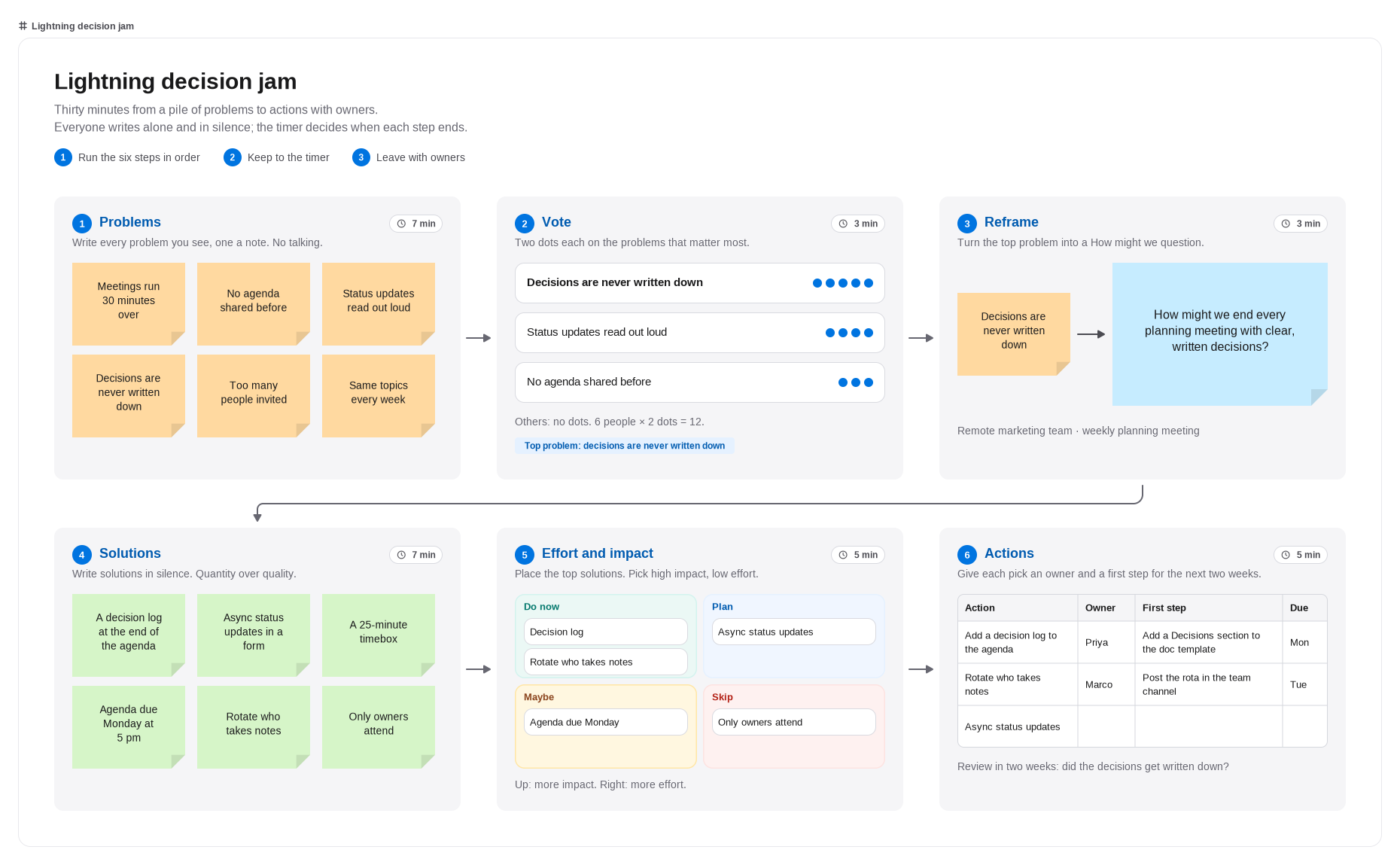
The template gives each of the six steps its own numbered panel with the minutes printed in the corner: 7, 3, 3, 7, 5 and 5, which adds up to half an hour. It is filled in for a remote marketing team whose weekly planning meeting keeps going wrong.
Steps 1 to 3: find the problem worth solving
The top row narrows many complaints down to one question.
- Problems, 7 min. Everyone writes every problem they see, one a note, without talking. The team produced six, including “Meetings run 30 minutes over”, “Too many people invited” and “Same topics every week”.
- Vote, 3 min. Two dots each on the problems that matter most. Six people placed 12 dots: five on “Decisions are never written down”, four on “Status updates read out loud” and three on “No agenda shared before”.
- Reframe, 3 min. The top problem is copied across and rewritten as a question: “How might we end every planning meeting with clear, written decisions?”
The reframe matters more than it looks. A complaint invites agreement and a sigh. A question invites answers, and the next step needs answers.
Steps 4 and 5: many solutions, then a quick sort
Step 4 repeats the silent writing, this time for solutions, and the panel says it outright: quantity over quality. The six notes range from “A decision log at the end of the agenda” to “A 25-minute timebox” and “Only owners attend”.
Step 5 places the top solutions on a two-by-two grid. Up means more impact and right means more effort, so the four boxes read Do now, Plan, Maybe and Skip. The decision log and rotating the note taker landed in Do now. Async status updates went to Plan, the Monday agenda deadline to Maybe, and “Only owners attend” to Skip.
The grid ends the argument about which idea is best. The team is only asked where each one sits.
Step 6: actions with an owner and a first step
The last panel is a table with four columns: Action, Owner, First step and Due. Two rows are complete. Priya owns the decision log, and her first step is to add a Decisions section to the doc template by Monday. Marco owns the note-taking rota and posts it in the team channel on Tuesday. The third row, async status updates, still has no owner, which shows honestly where the session stopped.
The first step is deliberately small. “Fix our meetings” is not something a person can do on Monday morning. Adding one section to a template is.
Under the table is a line to hold the team to it: review in two weeks, did the decisions get written down?
Why the silence and the clock matter
Look at how the vote is recorded. Three problems are listed with their dots beside them, the rest are summed up as “Others: no dots”, and one line names the winner. Nobody had to argue for their problem, and the quiet person's note had the same chance as the manager's.
The minutes in each panel's corner are the other half. Three minutes to vote feels short, and that is the idea: it stops people from campaigning. If a step runs out before everyone is done, move on anyway. An LDJ that takes 30 minutes gets run again next month. One that takes two hours does not.
How to run the lightning decision jam template
- Open it as a new board and clear the example notes, keeping the six panels and their minute labels.
- Name the subject. Replace “Remote marketing team · weekly planning meeting” in the Reframe panel with the thing you are fixing, so the problems stay on one topic.
- Run the six steps in order. Start a clock for each one with the minutes shown in its corner, and keep everyone writing in silence through steps 1 and 4.
- Fill the Actions table before anyone leaves. Every solution in Do now needs an owner, a first step and a due day.
- Come back in two weeks. Rewrite the review line as a question about your own top problem and answer it on the board.
The board's first instruction is short: run the six steps in order, keep to the timer, leave with owners.
When an LDJ fits, and when to pick something else
An LDJ suits a team problem that everyone feels but nobody owns: a meeting that drags, a slow handoff, a release process full of small pains. It works best with four to eight people who all live with the problem.
It is too light for a decision with big money or one-way consequences. For a week-long question, plan a design sprint. If you only need step 5, the impact effort matrix gives that grid a full board. And if the goal is to look back on a finished sprint, a start, stop, continue retrospective asks better questions.
Questions about the Lightning decision jam template
How long does a lightning decision jam take?
The six steps on this board add up to 30 minutes: 7 for problems, 3 to vote, 3 to reframe, 7 for solutions, 5 for the effort and impact grid and 5 for actions. Allow 40 the first time, since a new group needs each step explained.
Does the template have a built-in timer?
No. Each panel shows how many minutes its step should take, and the facilitator keeps time with a phone or a kitchen timer. Keeping the clock visible to everyone matters more than which clock it is.
Can a remote team run an LDJ on this board?
Yes, the example is a remote team. On the Team plan everyone writes notes on the same board at once. On Free and Pro one person edits, so the facilitator types the notes people send while the others watch and comment.
What if two problems tie in the vote?
Let the person who owns the outcome choose, or give everyone one extra dot for a second round between the tied notes. Do not merge the two into one vague problem. The reframe only works on a single, specific complaint.